Unleash Your Inner Artist with Code
Want to create stunning visuals, generative art, or interactive experiences? This list of top creative coding tutorials will help you blend art and technology. Whether you're a seasoned developer or just starting, these resources offer practical skills and inspiration. Explore diverse tools and techniques, from p5.js and D3.js to TouchDesigner and Unity. Learn to code creatively with these seven essential resources for 2025.
1. The Coding Train by Daniel Shiffman
All aboard! The Coding Train, helmed by the enthusiastic Daniel Shiffman, is a leading resource for anyone diving into the world of creative coding tutorials. Whether you're an aspiring "vibe coder," a seasoned software developer, a digital artist, or simply a curious learner, Shiffman's infectious energy and clear teaching style make complex concepts accessible and fun. This comprehensive series utilizes p5.js, Processing, and other creative coding frameworks to empower users to create everything from interactive art to data visualizations and simulations.
The Coding Train primarily focuses on project-based learning, guiding viewers through the creation of various coding projects step-by-step. This approach allows for practical application of concepts and reinforces understanding through hands-on experience. From simulating the flocking behavior of birds to visualizing complex neural networks, the projects cover a wide range of topics relevant to creative coding. Shiffman also regularly hosts livestreams, exploring new concepts and techniques in real-time, providing a unique opportunity for learners to engage directly and ask questions. All code examples are open-source, fostering a collaborative and supportive community around creative coding.
Features:
- Video-based tutorials on YouTube
- Covers p5.js, Processing, machine learning, and generative algorithms
- Project-based learning approach
- Regular livestreams
- Open-source code examples
Pros:
- Engaging and enthusiastic teaching style
- Builds complexity gradually
- Strong community support and forums (including a Discord server)
- Free and accessible
- Regular updates with new content
Cons:
- Can be overwhelming for absolute beginners with no programming experience (some foundational knowledge is recommended)
- Some projects require significant time investment
- Video format may not suit all learning styles
Examples of Coding Train Projects:
- Nature of Code series implementing physical simulations (e.g., gravity, forces, particle systems)
- Neural network visualization projects demonstrating machine learning concepts
- Generative art algorithms creating unique and dynamic visuals
- Interactive data visualizations transforming data into compelling narratives
Tips for Utilizing The Coding Train:
- Follow along by coding as you watch: Active participation reinforces learning.
- Join the Discord community: Connect with fellow learners, ask questions, and troubleshoot issues.
- Start with the beginner p5.js tutorials: Build a strong foundation before tackling more advanced topics.
- Try the coding challenges: Test your understanding and push your creative boundaries.
Why The Coding Train Deserves Its Place on this List:
The Coding Train offers a vibrant and accessible entry point into the world of creative coding. Daniel Shiffman's passion for coding is contagious, inspiring countless individuals to explore the creative potential of programming. The platform's comprehensive curriculum, project-based approach, and supportive community make it an invaluable resource for anyone seeking to learn and grow in this exciting field. Visit The Coding Train's YouTube channel to start your creative coding journey.
2. Creative Coding with Canvas & WebGL by Bruno Imbrizi
Bruno Imbrizi's Creative Coding with Canvas & WebGL tutorial offers a deep dive into the world of visually stunning web-based art and animation. This specialized course focuses on leveraging the power of JavaScript, the Canvas API, and WebGL to create interactive and engaging graphical experiences. Unlike tutorials that rely heavily on external libraries, this course emphasizes a from-first-principles approach, empowering you to understand the underlying mathematics and rendering techniques used in professional creative coding projects. This approach allows for greater control over performance optimization and opens up a world of possibilities for truly unique creations.
This tutorial is particularly well-suited for creating projects like interactive 3D particle systems, audio-reactive visualizations, custom shader development, and generative art installations. The course emphasizes industry-standard techniques and a professional workflow, making it invaluable for building a portfolio of high-quality visual projects. It delves into the technical aspects of rendering graphics in the browser while maintaining an artistic focus, bridging the gap between technical implementation and creative vision.
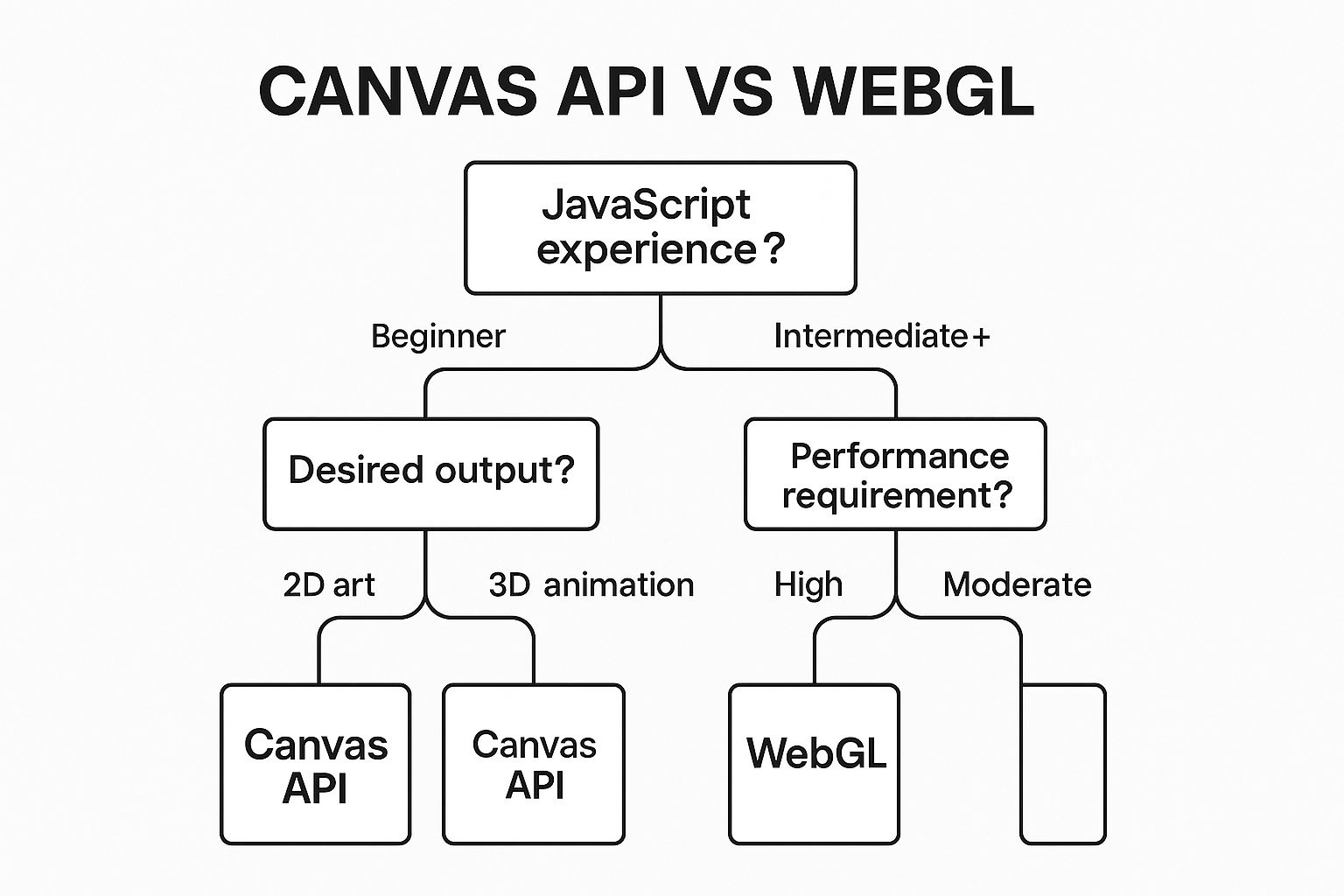
The following infographic helps you decide if this creative coding tutorial is right for you based on your current skill level and project goals. It visualizes the decision-making process for choosing between 2D Canvas and WebGL based on your project's complexity and performance needs.
As the infographic illustrates, the path you take depends on the complexity of your visuals. If you need simple 2D graphics, Canvas is sufficient. However, for 3D graphics or complex 2D scenes requiring high performance, WebGL is recommended. This branching logic makes the tutorial adaptable to various skill levels and project scopes.
This tutorial deserves its place on this list due to its unique focus on building a strong foundation in creative coding principles. Key features include its mathematics-based approach, in-depth coverage of shader programming fundamentals, and professional workflow techniques. You'll learn to optimize performance and work with vanilla JavaScript, Canvas, and WebGL, giving you a deep understanding of how these technologies work together.
Pros:
- Industry-standard techniques used in professional creative coding.
- Strong focus on performance optimization.
- Teaches from first principles without over-reliance on libraries.
- Emphasis on mathematics foundations for graphics.
- Produces portfolio-quality visual projects.
Cons:
- Requires intermediate JavaScript knowledge.
- Mathematics heavy (vectors, matrices, trigonometry).
- Paid course on platforms like Domestika or Frontend Masters.
- Less beginner-friendly than some alternatives.
Tips for Success:
- Brush up on trigonometry and linear algebra before starting.
- Use the Chrome DevTools performance tab to analyze your animations.
- Start with 2D Canvas projects before moving to the complexities of WebGL.
- Save your works-in-progress regularly as they can become valuable portfolio pieces.
Learn more about Creative Coding with Canvas & WebGL by Bruno Imbrizi (Note: This link currently redirects to a Three.js resource, which is related but not the exact course. Finding a direct link to the Bruno Imbrizi course would be ideal). This creative coding tutorial is perfect for aspiring vibe coders, experienced software developers, digital artists, and creative technologists looking to elevate their skills and create truly impressive visual experiences. It also offers valuable insights for educators, students, and innovative entrepreneurs exploring the intersection of art and technology.
3. Nature of Code by Daniel Shiffman
For those seeking to infuse their creative coding projects with the mesmerizing power of nature, "Nature of Code" by Daniel Shiffman is an indispensable resource. This comprehensive guide bridges the gap between mathematical concepts and visual, interactive programs, making it a top-tier choice among creative coding tutorials. It delves into the art of simulating natural systems using code, offering a unique approach to generating organic and dynamic visuals.
"Nature of Code" explores how to program algorithms that mimic natural phenomena. This involves translating complex mathematical equations governing forces, motion, and other behaviors into code that can be visualized and interacted with. Think simulating flocks of birds swirling in complex patterns, visualizing the growth of intricate fractal structures, or modeling the evolution of artificial life forms. This approach opens doors to creating truly organic and unpredictable digital experiences.
The resource began as a book but has expanded into a rich ecosystem of learning materials, including a dedicated website (https://natureofcode.com/) and a comprehensive video series. Whether you prefer the structured learning of a book, the visual guidance of videos, or the interactive nature of online tutorials, "Nature of Code" caters to various learning styles. Furthermore, the code examples are implemented in both Processing (Java-based) and p5.js (JavaScript), catering to users with varying programming backgrounds. The flexibility offered by these two popular creative coding platforms makes it accessible to a wider audience.
Successful Implementations: The principles taught in "Nature of Code" are behind a wide range of impressive creative coding projects. Examples include:
- Flocking behavior simulation (Boids algorithm): Simulating the complex movement of bird flocks or fish schools based on simple rules of attraction, separation, and alignment.
- Particle systems for visual effects: Creating dynamic and visually stunning effects like explosions, smoke, and fire using particle systems governed by forces like gravity and wind.
- Evolutionary algorithms creating optimized solutions: Utilizing genetic algorithms to evolve solutions to problems, like finding the optimal path through a maze or creating generative art.
- Fractal generation and L-systems: Generating intricate and self-similar patterns found in nature, such as snowflakes, ferns, and trees.
Why "Nature of Code" Deserves its Place: "Nature of Code" goes beyond simple code examples; it fosters a deeper understanding of the underlying mathematics and physics that govern natural systems. This makes it an excellent resource for those seeking to delve into the "why" behind the code. It teaches you to think algorithmically about natural systems, equipping you with transferable simulation skills applicable in various domains, including game development, data visualization, and generative art.
Pros:
- Deep dive into underlying mathematics and physics.
- Teaches how to think algorithmically about natural systems.
- Complete source code available on GitHub.
- Teaches transferable simulation skills.
- Self-paced learning through the book or website.
Cons:
- Requires solid programming fundamentals.
- Math-heavy content may be challenging for some.
- Book version requires purchase (though online content is free).
- Some examples may be computationally intensive.
Actionable Tips:
- Work through the examples incrementally, building upon previous concepts.
- Create a personal project that combines multiple natural systems.
- Modify the example code to create unique variations and explore different parameters.
- Start with understanding forces and vectors before moving on to more complex systems like neural networks and genetic algorithms.
"Nature of Code" is an invaluable resource for anyone seeking to elevate their creative coding skills by incorporating simulations of natural systems. Whether you are an aspiring vibe coder, a seasoned software developer, a digital artist, or simply a curious learner, this resource offers a powerful toolkit for creating captivating and dynamic digital experiences. It distinguishes itself from other creative coding tutorials through its focus on the fundamental principles of nature, empowering users to generate genuinely organic and emergent behavior in their projects.
4. Creative Coding with TouchDesigner by Bileam Tschepe (elekktronaut)
If you're looking for creative coding tutorials that push the boundaries of real-time visual experiences, then exploring TouchDesigner is a must. Developed by Derivative, TouchDesigner is a powerful node-based visual programming language specifically designed for creating interactive multimedia content. This platform is a popular choice for everything from audio-visual performances and interactive installations to generative art and immersive experiences. This section focuses on the excellent learning resources provided by Bileam Tschepe (elekktronaut), offering a fantastic entry point into this exciting world.
TouchDesigner uses a visual programming paradigm, meaning you manipulate networks of nodes instead of writing lines of traditional code. Each node represents an operation, effect, or data source, and by connecting these nodes together, you build complex systems that generate visuals, process audio, and respond to user input. This approach allows for rapid prototyping and experimentation, making it ideal for creative coding where immediate visual feedback is essential.
Why TouchDesigner Deserves a Place in this List:
TouchDesigner stands out for its incredible capabilities in real-time rendering, its seamless integration of audio and visuals, and its robustness in handling complex projects. Its popularity in professional settings, from live music visuals to large-scale interactive installations, signifies its power and relevance in the field of creative coding. The tutorials by Bileam Tschepe provide a structured pathway to learning this powerful software, making it accessible to a wider audience.
Features and Benefits:
- Node-based visual programming: No traditional coding required, allowing for a more intuitive and experimental workflow.
- Real-time rendering and interaction design: Create responsive and dynamic visuals that react to user input in real time.
- Audio-visual integration: Seamlessly combine audio and visual elements for immersive and engaging experiences.
- Physical installation setup techniques: Learn how to translate your TouchDesigner creations into real-world installations using projectors, sensors, and other hardware.
- Integration with hardware (Kinect, MIDI, sensors): Expand the possibilities of your projects by connecting with a wide range of external devices.
Pros:
- Immediate visual feedback: See the results of your changes instantly, accelerating the creative process.
- Strong in audio-reactive applications: Create stunning visuals that respond dynamically to music and sound.
- Excellent for installations and live performances: Robust and reliable for demanding real-time applications.
- Growing industry demand for these skills: Learning TouchDesigner can open doors to exciting career opportunities.
Cons:
- Steeper learning curve than some platforms: Mastering the node-based workflow requires dedicated effort.
- Full software license is expensive (though a non-commercial version is free): The cost can be a barrier for some users.
- Resource-intensive on computer hardware: Complex projects can require powerful hardware for smooth performance.
- Less transferable skills to traditional programming: The visual programming paradigm is distinct from text-based coding.
Examples of Successful Implementation:
- Projection mapping installations: Transforming physical spaces with dynamic projected visuals.
- Live visual performances for musicians: Creating captivating real-time visuals synchronized with music.
- Interactive gallery installations: Engaging audiences with immersive and responsive art experiences.
- Generative art exhibitions: Showcasing algorithmically generated artwork.
Tips for Getting Started:
- Start with understanding the TouchDesigner interface and node types: Familiarize yourself with the basic building blocks of the software.
- Build small projects before attempting complex installations: Gradually increase the complexity of your work as you gain experience.
- Join the TouchDesigner forum for community support: Connect with other users and learn from their expertise.
- Save versions of your work frequently as patch files can get complex: Avoid losing progress due to unexpected issues.
This approach to creative coding using TouchDesigner, particularly through Bileam Tschepe's tutorials, offers a unique and powerful way to create stunning interactive experiences. Whether you're an aspiring VJ, a digital artist, or a creative technologist, TouchDesigner's capabilities offer a wealth of possibilities for pushing the boundaries of your creative expression. While the learning curve can be steep, the rewards are significant for those willing to invest the time and effort.
5. Generative Design with p5.js by Tim Rodenbröker
For designers venturing into the world of creative coding, Tim Rodenbröker's approach to generative design with p5.js offers a compelling entry point. This tutorial series distinguishes itself by focusing on systematic visual design principles applicable to graphic design, web design, and digital art. It leverages the accessible p5.js JavaScript library, making it ideal for beginners while providing a robust framework for more experienced coders to explore generative techniques. Instead of diving deep into complex animations or interactions, the emphasis here is on building a foundation in design thinking through code. You'll learn to create visual systems that produce a variety of outputs, rather than single static images. This makes it a powerful tool for exploring different design variations and iterating on ideas quickly.
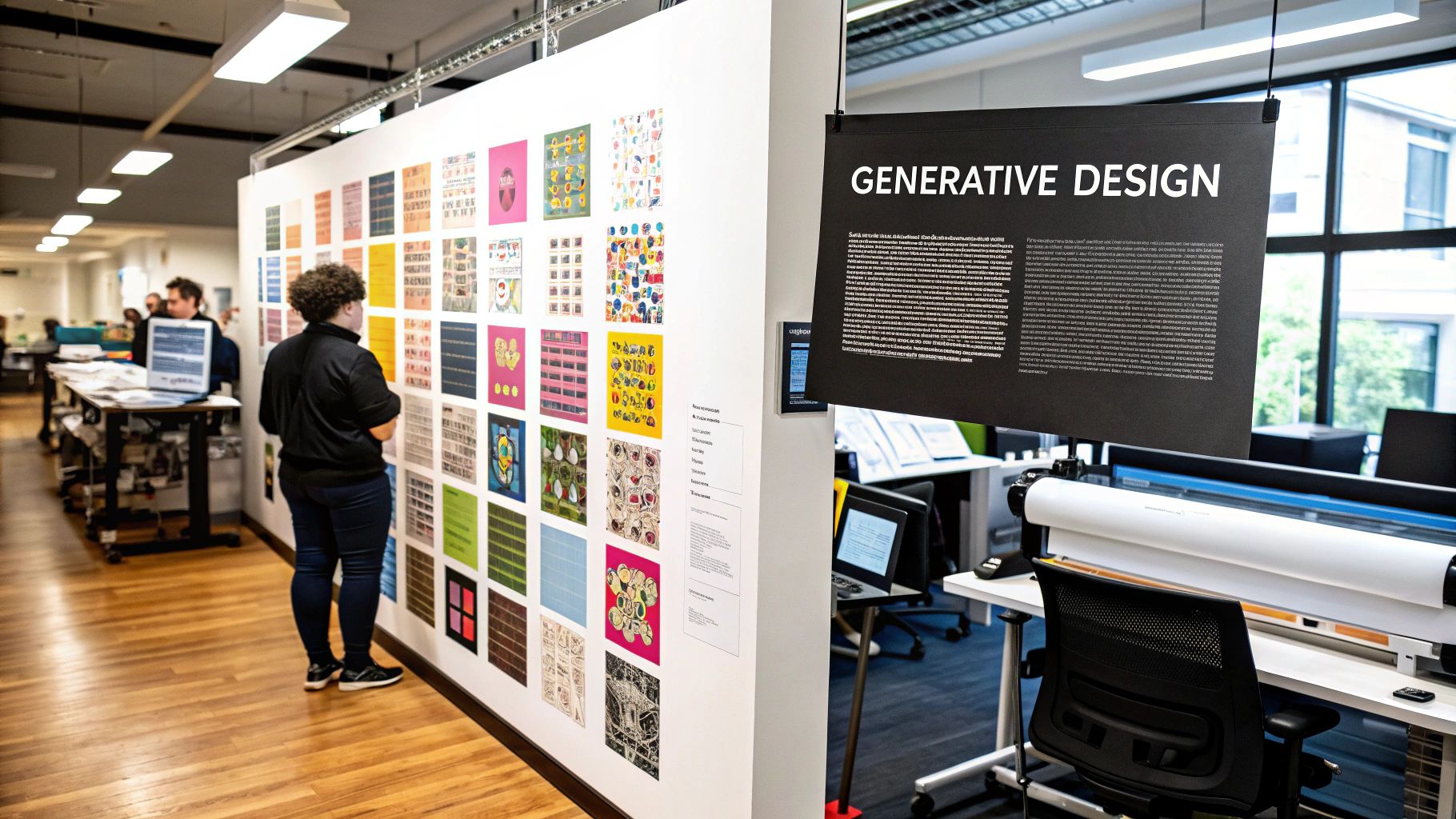
Rodenbröker's method centers around understanding randomness and constraints within a design system. By defining parameters and introducing controlled randomness, you can generate a vast range of unique outputs while maintaining a cohesive visual style. The tutorials cover key design principles, including typography, layout systems, and color theory, all implemented through code. This allows designers to translate their existing design knowledge into a computational environment. One of the key strengths of this approach is its emphasis on practical application. You'll learn how to export your generative creations in formats suitable for both print and digital media, leading to portfolio-ready design projects. Examples of what you can achieve include generative poster designs, algorithmic typography systems, data-driven visual identities, and parametric pattern design.
Learn more about Generative Design with p5.js by Tim Rodenbröker (Note: This link points to a general resource on GSAP, not specifically Rodenbröker's p5.js tutorials. A dedicated link would be more beneficial.)
This particular approach within creative coding tutorials is highly beneficial for designers who want to expand their skillset and incorporate computational design into their workflow. The focus on design principles ensures that the code serves as a tool to enhance creative expression, not replace it. By thinking systematically, designers can use code to explore a broader design space and push the boundaries of traditional design processes.
Pros:
- Perfect for designers learning to code.
- Practical applications for graphic design work.
- Produces portfolio-ready design projects.
- Focuses on design principles alongside code.
- Teaches systematic thinking for designers.
Cons:
- Less focus on interactive or animated content.
- Limited coverage of 3D capabilities.
- Some courses require payment.
- More specialized than general creative coding tutorials.
Tips for Success:
- Think like a designer while coding, focusing on composition and hierarchy.
- Create systems rather than static outputs.
- Document your process and variations.
- Learn how to export high-resolution outputs for print.
This tutorial series, popularized by Tim Rodenbröker and his work on generative design, including his book and Domestika courses, offers a valuable resource for anyone interested in bridging the gap between design and code. It deserves its place in this list of creative coding tutorials due to its unique design-centric approach, empowering designers to harness the power of code for creative exploration and practical application.
6. Creative Coding in Unity by Keijiro Takahashi
Keijiro Takahashi, a prominent figure in the creative coding community, has pioneered the use of Unity, a popular game engine, for artistic expression beyond game development. This approach opens up a world of possibilities for creating stunning visuals, interactive installations, and experimental projects. This section explores how Unity facilitates creative coding, offering a powerful alternative to traditional web-based tools.
Unity, at its core, is a 3D rendering engine with a robust physics system and scripting capabilities. While commonly associated with game creation, its features can be leveraged for artistic endeavors. Creative coding in Unity involves using C# scripts, shader programming (HLSL), and visual scripting tools like VFX Graph to manipulate objects, generate procedural geometry, create complex visual effects, and build interactive systems. This allows artists and developers to generate real-time visuals, simulations, and experiences that push the boundaries of digital art.
Why Unity for Creative Coding? Unity's strengths lie in its professional-grade graphics capabilities, advanced rendering techniques, and cross-platform deployment options. Features like VFX Graph and powerful particle systems empower artists to create breathtaking visuals, while the integration with computer vision and AR/VR technologies opens doors for immersive experiences. Furthermore, its extensive community, rich asset ecosystem, and industry-standard status ensure ample resources, learning opportunities, and transferable skills. This makes Unity a compelling option for those seeking to explore creative coding within a robust and versatile environment.
Examples of Creative Coding in Unity:
- Interactive Music Visualizers: React to audio input in real-time, generating dynamic visuals synchronized with music.
- VR Art Experiences: Craft immersive virtual worlds and interactive art installations accessible through VR headsets.
- Real-time Procedural Animation: Algorithmically generate animations and movements, creating unique and unpredictable visual patterns.
- Audio-reactive Installations: Design installations that respond to sound, transforming audio data into dynamic lighting and visual displays.
Tips for Getting Started:
- Start with the Basics: Familiarize yourself with Unity's interface and fundamental concepts by following the official Unity tutorials.
- Explore Keijiro's Work: Delve into Keijiro Takahashi's GitHub repositories for inspiration and advanced techniques. His projects provide invaluable insights into creative coding with Unity.
- Utilize the Package Manager: Expand Unity's functionality by installing experimental packages offering cutting-edge features.
- Leverage the Asset Store: Save time and effort by utilizing pre-built assets and tools available in the Unity Asset Store.
Pros and Cons of Using Unity for Creative Coding:
Pros:
- Professional-grade Graphics: Access industry-standard rendering capabilities for high-quality visuals.
- Powerful 3D Engine: Leverage a robust 3D environment for complex simulations and spatial experiences.
- Cross-platform Deployment: Easily deploy your creations across multiple platforms, including desktop, mobile, web, and consoles.
- Extensive Community & Ecosystem: Benefit from a large and active community, along with a vast library of assets and resources.
- Industry-Standard Tool: Gain valuable skills applicable to game development and other creative industries.
Cons:
- Steeper Learning Curve: Mastering Unity requires more effort compared to simpler web-based creative coding tools.
- C# Programming Required: A foundational understanding of C# programming is necessary for effective scripting.
- Resource-Intensive: Unity can be demanding on system resources, requiring a reasonably powerful computer.
- Overkill for Simple 2D: For basic 2D projects, lighter-weight alternatives might be more suitable.
This approach deserves a place on this list because it empowers creative coders with the tools and resources to produce high-fidelity visuals and interactive experiences. While the learning curve might be steeper than some web-based platforms, the potential for creating sophisticated and impactful work justifies the investment. For those seeking to push the boundaries of creative coding and explore the realm of real-time 3D graphics, Unity offers an unparalleled platform for artistic expression. For more information and resources, visit the Unity website.
7. Interactive Data Visualization with D3.js by Shirley Wu and Nadieh Bremer
This creative coding tutorial focuses on the power of data visualization using D3.js (Data-Driven Documents), a JavaScript library renowned for creating interactive and dynamic visualizations on the web. It bridges the gap between creative coding and data analysis, empowering you to transform raw data into compelling visual narratives and interactive experiences. This approach is particularly relevant for aspiring vibe coders, experienced software developers, digital artists and creative technologists, educators and students in tech, and innovative entrepreneurs and hobbyists looking to add powerful data storytelling to their skillset.
D3.js works by manipulating the Document Object Model (DOM), allowing you to bind data to HTML, SVG, and Canvas elements. You can then use its extensive API to create various charts, graphs, and custom visualizations. This data-driven approach to creative coding makes D3.js incredibly versatile for representing complex information in an accessible and engaging way. Learn more about Interactive Data Visualization with D3.js by Shirley Wu and Nadieh Bremer to explore setting up your development environment for this powerful tool. The tutorial series by Shirley Wu and Nadieh Bremer emphasizes not just technical proficiency but also design principles for effective data communication. They delve into SVG and Canvas rendering techniques, demonstrating how to create interactive elements, animations, and transitions to bring your visualizations to life.
Examples of Successful Implementation:
- Interactive news graphics: Imagine exploring election results through a dynamic map that updates in real-time, or visualizing economic trends with animated charts. D3.js empowers journalists and data analysts to tell complex stories in engaging formats.
- Corporate data dashboards: Businesses can leverage D3.js to create interactive dashboards that visualize key performance indicators (KPIs), sales data, and customer demographics. This facilitates data-driven decision-making and provides insights at a glance.
- Scientific visualization projects: Researchers can use D3.js to visualize complex scientific datasets, from astronomical observations to biological simulations. This makes research findings more accessible and understandable.
- Data art installations: D3.js can even power interactive data art installations, transforming data streams into dynamic and visually stunning experiences.
Tips for Getting Started:
- Start small: Begin with small datasets and simple visualizations to grasp the fundamentals of D3.js before tackling complex projects.
- Sketch first: Sketch your visualization concept on paper before writing code. This helps clarify your design goals and data representation strategy.
- Master the update pattern: Learn the D3 update pattern, a crucial concept for creating dynamic visualizations that respond to changing data.
- Prioritize clarity: Focus on communicating data insights clearly and effectively before adding aesthetic flourishes.
Pros:
- Highly practical for data journalism and analytics: D3.js is a powerful tool for turning data into insightful and shareable stories.
- Creates professional portfolio-quality visualizations: Mastering D3.js is a significant asset for anyone working with data visualization.
- In-demand skill in tech and media industries: D3.js skills are highly sought after in fields that require data visualization expertise.
- Teaches both artistic and analytical thinking: This tutorial blends creative expression with data analysis, a valuable combination in today's data-driven world.
- Works with real-world datasets: The tutorials often utilize real-world datasets, providing practical experience.
Cons:
- Steep learning curve: D3.js has a steeper learning curve compared to some other charting libraries.
- Requires web technologies knowledge: You need a solid understanding of HTML, CSS, and JavaScript to work effectively with D3.js.
- Less focused on purely artistic expression: While D3.js offers creative possibilities, its primary focus is on data visualization rather than purely artistic expression.
- Performance challenges with large datasets: Optimizing performance can be challenging when working with very large datasets.
This tutorial deserves its place on this list of creative coding tutorials because it empowers you to transform data into compelling visual narratives. It offers a unique blend of creative expression and technical skill development, making it highly relevant in today's data-centric world. Through this tutorial, you'll not only learn a powerful tool but also gain the ability to communicate data effectively and beautifully, a crucial skill in various fields.
Creative Coding Tutorials Comparison
| Tutorial | Implementation Complexity 🔄 | Resource Requirements ⚡ | Expected Outcomes 📊 | Ideal Use Cases 💡 | Key Advantages ⭐ |
|---|---|---|---|---|---|
| The Coding Train by Daniel Shiffman | Beginner to Intermediate; gradual build | Low; free video tutorials and open source | Creative coding skills in p5.js, Processing | Beginners to intermediate coders; creative projects | Engaging teaching, strong community, regularly updated |
| Creative Coding with Canvas & WebGL by Bruno Imbrizi | Intermediate to Advanced; math-heavy | Medium; requires JS knowledge, paid courses | Professional-quality graphics and shader coding | Developers aiming for performance and visuals | Industry-standard techniques, performance focus |
| Nature of Code by Daniel Shiffman | Intermediate; math and physics focused | Low to medium; book purchase optional | Deep simulation skills of natural systems | Learners interested in natural algorithms and physics | In-depth math/physics, transferable to simulation dev |
| Creative Coding with TouchDesigner by Bileam Tschepe | Beginner to Advanced; visual programming | High; software license & powerful hardware | Real-time interactive multimedia & installations | Audio-visual artists; live performances, installations | Visual programming, immediate feedback, installation-ready |
| Generative Design with p5.js by Tim Rodenbröker | Beginner to Intermediate; design-oriented | Low to medium; some paid courses | Portfolio-ready generative design projects | Designers learning coding; graphic/digital design | Design principles focus, practical for graphic design |
| Creative Coding in Unity by Keijiro Takahashi | Intermediate to Advanced; game engine | High; resource-intensive IDE, C# knowledge | Professional 3D VFX and interactive installations | Developers wanting 3D/VR/AR art and advanced rendering | Powerful 3D engine, cross-platform, industry-grade tools |
| Interactive Data Visualization with D3.js by Shirley Wu & Nadieh Bremer | Intermediate to Advanced; web tech focus | Medium; requires JS, HTML, CSS skills | Interactive, data-driven visual narratives | Data visualization, journalism, analytics | Professional visualizations, in-demand skillset |
Elevate Your Creative Coding Journey
This exploration of seven diverse creative coding tutorials has provided a glimpse into the dynamic landscape of generative art, interactive experiences, and data visualization. From Daniel Shiffman's engaging "Coding Train" and "Nature of Code" to Bruno Imbrizi's deep dive into Canvas and WebGL, each resource offers unique insights and techniques to enrich your coding toolkit. Whether you're just starting with p5.js or exploring advanced concepts in TouchDesigner and Unity, these tutorials empower you to transform code into compelling visual narratives. Key takeaways include understanding fundamental programming concepts, experimenting with different libraries and frameworks, and embracing the iterative nature of creative coding.
Mastering these concepts is invaluable for anyone seeking to blend technology and artistic expression. The ability to generate art through code opens up a world of possibilities, from creating unique digital artwork to designing interactive installations and visualizing complex data. Many creative coding projects lead to generating unique digital artwork. If you're interested in turning your coding creations into a source of income, explore resources on selling digital art online from Picture It, which offer proven tips and strategies. As your skills develop, you’ll be able to push the boundaries of what's possible, crafting innovative experiences and pushing the limits of digital creativity.
Your next steps? Choose a tutorial that sparks your interest, dive in, and start experimenting! Don’t be afraid to explore different platforms, combine techniques, and develop your own unique style. The world of creative coding is vast and constantly evolving—embrace the journey, and let your imagination guide you. The only limit is your creativity.