Understanding What Makes Generative Art So Captivating
This screenshot from the Wikipedia page on Generative Art gives you a glimpse into some classic examples and a bit of its history. Check out the different styles – it hints at the sheer range of what’s possible with this art form. From geometric abstraction to organic shapes, it shows how algorithms can be a powerful tool for creative coding. It’s like code becomes a brush in the artist's hand.
So, why is generative art suddenly so popular? It's not just a fad; it's a real shift in how we think about creativity. Talking to digital artists, I’ve noticed a recurring theme: the excitement of working with code. You set the rules, define the boundaries, and then let the algorithm do its thing. It's all about letting go of that pixel-perfect control you have in traditional digital art and embracing the element of surprise.
The Allure of the Unexpected
Imagine composing music not note by note, but by creating a system that generates melodies. That’s the core of generative art. You're not making one image; you're building a system that can create endless variations. This opens up a world of unexpected beauty, shapes, and patterns you might never have thought of on your own. That unpredictability is a huge part of the magic.
Artists like Casey Reas and Tyler Hobbs are pushing the limits of what's possible, creating pieces that sell for serious money. Their work proves that generative art isn’t about random computer-generated images. It's about using algorithms to express a unique artistic vision. This approach draws in all kinds of creatives, from traditional painters exploring new ways to express themselves to tech folks looking for a creative outlet.
A Rich History and a Bright Future
Generative art isn’t new. It’s got a history going back centuries, with more modern versions appearing in the late 20th century. The term “generative art” really gained traction through events like the first International Generative Art conference in 1998 at the Politecnico di Milano University in Italy. More on the history of generative art here. But tools like Processing and p5.js, along with the growing interest in AI, have really brought generative art into the mainstream.
Embracing the Generative Mindset
This shift from direct control to working with algorithms requires a different way of thinking. It’s about welcoming the unexpected, seeing your computer not as just a tool, but as a collaborator. It's about the joy of discovery, the thrill of seeing your code bring something new to life. This part of our generative art tutorial will dive into the principles and techniques that let you build these captivating systems. We'll see how simple rules can lead to complex and beautiful results. You’ll be able to explore a vast creative landscape limited only by your imagination and the power of the algorithms you create.
Getting Your Creative Coding Setup Right
Let's ditch the jargon and dive into the tools real generative artists use daily. We'll focus on Processing Processing and p5.js p5.js, the heavy hitters in the creative coding world.
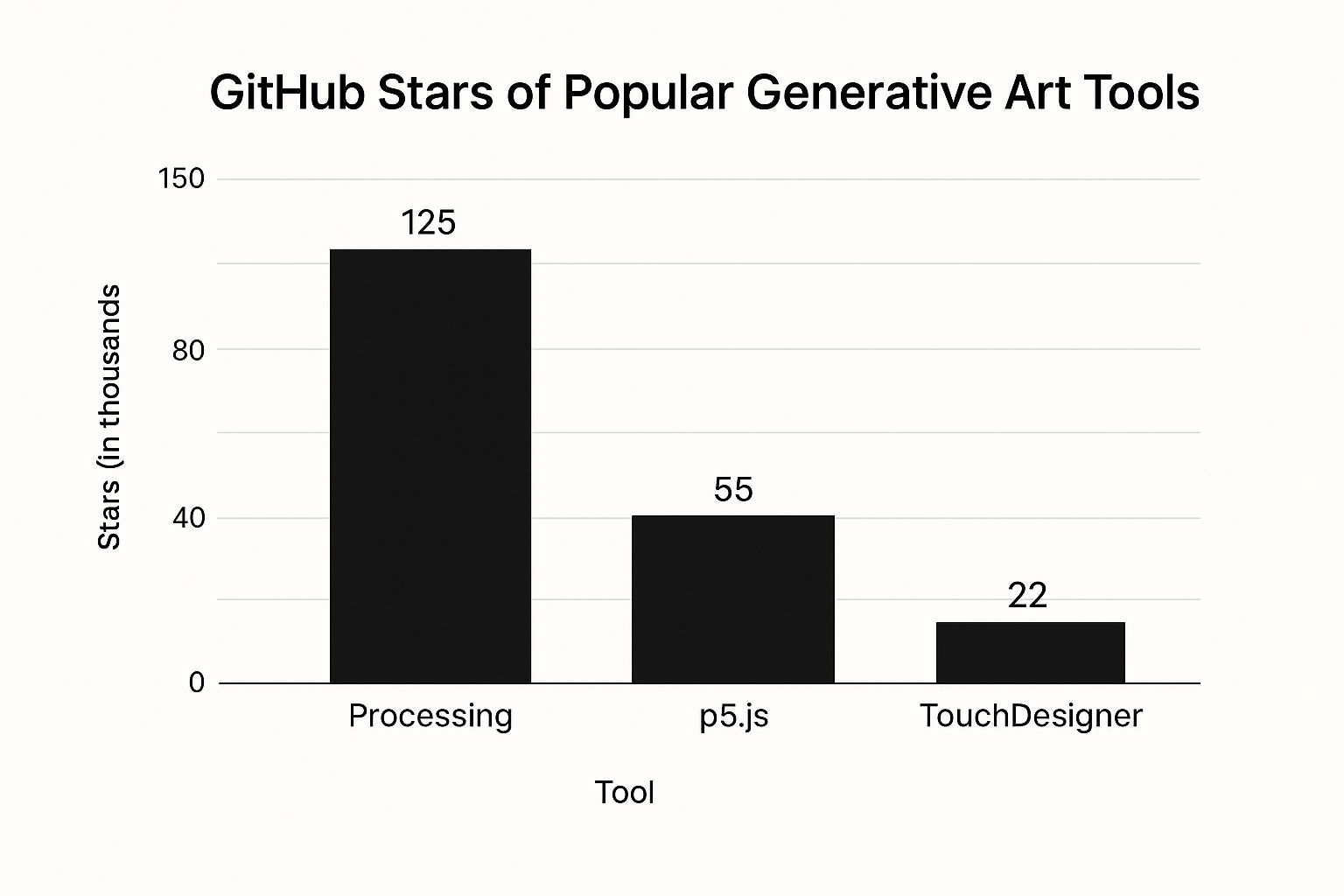
This infographic shows the GitHub stars for a few popular generative art tools. Processing has a massive community (125k stars) compared to p5.js (55k) and TouchDesigner TouchDesigner (22k). A big community is a huge plus when you're stuck or need inspiration.
Why Processing and p5.js?
I've played around with a lot of platforms, and these two always come out on top. They're popular for a reason: they're easy to learn, packed with features, and have amazing communities. Plus, they’re both based on Java, so switching between them is a breeze.
This is the Processing website – your starting point for desktop coding. It's got a clean interface and tons of resources to get you started with generative art. You can download the software, check the documentation, and find plenty of examples.
Desktop vs. Browser: Choosing Your Battlefield
Processing is a desktop app – download it, install it, and you're ready to code. This gives you access to all your computer's power, which is great for complex projects. p5.js runs in your browser. This makes sharing super easy – just send a link! It's perfect for quick sketches and web-based projects. For a broader look at tools, check out our other tools.
Essential Libraries and Communities
Both platforms have tons of libraries that add extra functionality. Need to simulate physics or create crazy 3D shapes? There’s probably a library for that. This saves you a ton of time and lets you focus on the art. And the communities? Amazing. Both Processing and p5.js have active online forums and groups. Trust me, you'll need them when you get stuck (and you will).
Before we jump into coding, let's look at some popular generative art tools. This table summarizes their strengths and weaknesses:
Popular Generative Art Tools Comparison
A comprehensive comparison of the most popular generative art creation tools, their features, learning curves, and best use cases
| Tool | Programming Language | Difficulty Level | Best For | Community Support |
|---|---|---|---|---|
| Processing | Java | Beginner-Friendly | Desktop-based projects, complex visuals | Excellent |
| p5.js | JavaScript | Beginner-Friendly | Web-based projects, sharing | Excellent |
| TouchDesigner | Python | Intermediate | Real-time visuals, interactive installations | Good |
This table highlights the key differences between these tools, helping you pick the right one for your needs. Processing is king for complex desktop projects, while p5.js shines for web-based work and sharing. TouchDesigner is a powerful tool for real-time visuals but has a steeper learning curve.
Pro Workflow Tips
Here are some tips I've learned from pro generative artists:
- Version Control: Use Git (or something similar) to track your code changes. It's a lifesaver when you need to go back to an older version or work with others.
- Modular Code: Break your code into reusable functions. This makes it way easier to manage and create variations of your art.
- Documentation: Even if it’s just for you, document your code! Future you will thank you.
- Experiment: Don't be afraid to try new things. Some of the coolest generative art comes from happy accidents.
By setting up your workflow right and using these tips, you'll be creating awesome generative art in no time.
Building Your First Piece: Dancing Particles That Respond
This is the p5.js website. It’s a goldmine for making generative art right in your browser. Seriously, check out the docs, the examples, and the super supportive community. You’ll find everything you need to kickstart your generative art journey. The website itself is a testament to how simple and accessible p5.js is, making it perfect for beginners.
Let's ditch the boring bouncing ball tutorials and build something really cool: a system of flowing, interacting particles that create unpredictable patterns. The first time I saw a truly captivating particle system, it felt like watching a miniature universe come to life. That’s the magic we're after here.
Bringing Your Particles to Life With Basic Physics
We'll start with the basics of movement. Every particle needs a position, a velocity, and an acceleration. Think of it this way: position is where the particle is, velocity is where it's going, and acceleration is how that velocity is changing. These are the fundamental ingredients of any particle system.
- Position: Give each particle random x and y coordinates on your canvas. It’s like scattering them across your digital playground.
- Velocity: Give them a random initial velocity – a push in a random direction at a random speed.
- Acceleration: You can set this to zero at the start. Later, we can use acceleration to add forces like gravity or attraction.
Adding a Touch of Randomness for Organic Movement
Want to make your digital art feel truly alive? Add randomness. Strictly following rules creates something mechanical and predictable. Tiny random variations in particle behavior make a world of difference.
Try adding a tiny random nudge to each particle's acceleration every frame. This little bit of jitter creates a sense of organic, unpredictable motion.
Evolving Color for Emotional Depth
Color is incredibly powerful. It sets the mood. Don't settle for static colors. Make them change over time. Maybe a particle's color shifts based on its speed, its position, or even its interactions with other particles. It adds emotional depth.
I've found that something as simple as changing color based on velocity can produce some really dramatic effects. Experiment and see what you like!
Embracing Happy Accidents
Generative art thrives on experimentation. Don't be afraid to play with your code. Some of the coolest effects happen by chance. I once accidentally flipped a sign in my code, and suddenly my particles started orbiting each other like tiny planets. A happy accident!
Simulating Natural Forces
Playing with mathematical relationships can make your particle system even more interesting. Here are a few things to try:
- Attraction/Repulsion: Particles can attract or repel based on how close they are to each other.
- Gravity: Add a constant downward acceleration to simulate gravity.
- Wind: Simulate wind with a constant horizontal acceleration.
- Magnetic Fields: Simulate magnetic fields to create cool swirling patterns.
It might surprise you, but generative art has a long and fascinating history. The Generative Art Timeline, created by Peter Bauman at Le Random, traces a 70,000-year journey of generative art practices! It's an incredible resource.
Remember, each line of code is a brushstroke. Understanding how the system works empowers you to make it your own. Tweak parameters, experiment with forces, and see where your particles lead you. This is all about sparking your creativity and giving you the tools to make amazing things.
Mastering Algorithms That Create Natural Beauty
So, you've played around with generative art and made some cool moving particles. Ready to level up? Let's dive into the techniques that transform generative art from interesting experiments into captivating works of art – visuals that feel organic, complex, and truly unique.
Harnessing the Power of Perlin Noise
One of the dead giveaways that something is computer-generated is its artificial perfection. Perlin noise is the fix. It's a mathematical function that produces smooth, organic-looking randomness. Think of it as the subtle variations you see everywhere in nature – clouds, wood grain, ripples in sand. I first used Perlin noise when I was trying to build realistic terrain for a game, and it completely changed the game (pun intended!).
Artists use Perlin noise to simulate all kinds of natural phenomena in their generative art. Flowing textures, swirling patterns, even simulating erosion over time – it’s incredibly versatile. Once you get the hang of it, you'll find endless ways to use it.
Exploring Recursive Patterns and Cellular Automata
Recursion is the magic of building complexity from simple rules. It's a function calling itself, which generates patterns that repeat at different scales. Fractals are a classic example. A simple rule, repeated over and over, creates intricate and infinitely detailed patterns. I've seen artists use recursion for everything from branching trees to complex geometric mandalas.
Cellular automata are a different kind of magic. They’re like tiny universes with simple rules. Each "cell" in a grid interacts with its neighbors according to these rules. Think of simulating plant growth or the spread of fire. The results can be surprisingly complex and organic. A lot of generative art is based on this idea.
Mastering Algorithmic Color Theory
Color is just as important as form in generative art. Algorithmic color theory explores how mathematical relationships can generate beautiful color palettes. Instead of choosing colors by hand, you build systems that generate colors dynamically.
Imagine creating a palette that smoothly shifts over time, or one that reacts to the patterns your algorithms create. I've seen artists use mathematical functions to make gradients that look like sunsets or the shifting colors of the ocean.
Combining Techniques for Layered Compositions
The real magic happens when you mix and match. Layering Perlin noise with recursive patterns, for example, can produce rich and detailed textures. Algorithmic color then breathes life into those textures.
Experienced generative artists often combine many different algorithms, each contributing to the overall composition. Think of it like composing music, where different instruments play different parts to create a harmonious whole.
Let's take a look at how some of these algorithms stack up against each other in terms of complexity and visual potential:
Algorithm Complexity and Visual Impact
Analysis of different generative art algorithms showing their computational requirements versus visual impact potential
| Algorithm Type | Complexity Level | Processing Power Needed | Visual Impact | Common Applications |
|---|---|---|---|---|
| Perlin Noise | Low to Medium | Low | High (for organic textures) | Terrain generation, clouds, textures |
| Recursion (Fractals) | Medium to High | Medium to High | High (for intricate details) | Trees, plants, geometric patterns |
| Cellular Automata | Medium | Low to Medium | High (for emergent behavior) | Simulations, patterns, organic growth |
| Algorithmic Color | Low to Medium | Low | High (for dynamic palettes) | Gradients, color transitions, data visualization |
This table gives you a quick overview of how each algorithm can contribute to your artwork. Remember, these are just starting points – the real fun begins when you combine them!
Balancing Complexity with Visual Clarity
A common trap is getting carried away with complexity. While these techniques can create amazing detail, visual clarity is key. Too much complexity can make a piece feel chaotic and overwhelming.
The trick is finding the right balance between detail and simplicity. Experienced artists often use contrast and focal points to guide the viewer's eye. They might balance areas of high detail with negative space, making the piece engaging but not overwhelming.
Optimizing Performance for Smooth Execution
As your algorithms get more complex, you’ll likely run into performance issues. Generating thousands of elements with complex rules can really bog down your computer.
Here are some performance optimization tips to keep things running smoothly:
- Pre-calculation: Calculate anything that doesn't change often ahead of time, instead of recalculating every frame.
- Chunking: Break up big calculations into smaller pieces to avoid freezing your application.
- Data structures: Use efficient data structures for storing and accessing information quickly.
Performance doesn't have to be a major headache early on, but learning these techniques will be a lifesaver as your projects get more ambitious. And trust me, once you start exploring these advanced techniques, your ambition will grow. This gives you the foundation you need to create truly remarkable generative art.
Integrating AI Tools Into Your Creative Process
The intersection of generative art and AI is where things get really interesting. And surprisingly accessible, too. Forget slogging through dense machine learning papers; we're talking practical application for working artists. Think tools like RunwayML, VQGAN+CLIP, and Stable Diffusion. I still remember the first time I saw an artist use style transfer to meld algorithmic patterns with a Van Gogh; mind-blowing stuff. That's the kind of creative potential we're unlocking here.
Style Transfer: Blending Algorithms With Artistic Movements
Imagine fusing your algorithms with the style of your favorite artist. That's the magic of style transfer. AI algorithms dissect an image's style–brushstrokes, colors, composition–and apply those elements to your generative work. It's not just imitation; it's a creative fusion, blending your vision with the essence of an artistic movement.
For example, generate a geometric pattern and then apply style transfer using a Picasso painting as a reference. The result? Your intricate algorithm, now infused with Picasso's fractured, cubist aesthetic. This is a powerful technique for exploring new artistic avenues, adding unexpected layers of beauty.
Neural Networks: Generating Textures and Forms
Generating complex textures and organic forms in code can be tedious. But neural networks can create them in seconds. Tools like Stable Diffusion let you use text prompts or image references. The network then generates variations. Imagine requesting "swirling clouds of vibrant color" or "a field of bioluminescent flowers." The network delivers, giving you diverse options to incorporate into your art.
This isn't about replacing your coding skills; it's about augmenting them. These AI tools create elements that would take hours to code manually. You're free to focus on the broader artistic direction. Think of it as a digital assistant for visual creation. Use these generated elements as building blocks in your larger compositions. Generate textures with a neural network, then use your coding skills to arrange them into a dynamic, evolving pattern.
Training Your Own AI Model: Expressing Your Unique Style
Ready to level up? Train your own simple AI models on your artistic style. This generates new elements consistent with your existing work, creating a digital extension of your artistic voice. While training a full AI model is technically demanding, platforms like RunwayML offer accessible interfaces that streamline the process for artists.
The possibilities are exciting. Train a model on your past work and then use it to generate variations or new elements that seamlessly integrate with your artistic universe. Push your style's boundaries and explore new directions while maintaining a cohesive identity. The rise of AI art has been significant. By 2021, it had become a major force, as explored in this Artnet News article.
Pre-trained vs. Custom Models: Choosing The Right Approach
When do you use pre-trained models, and when do you build your own? Pre-trained models like those in Stable Diffusion are excellent for generating a wide variety of content based on general prompts. Need a specific texture, object, or style you don't have the time to code? A pre-trained model is a great option.
But for something truly unique, something deeply personal, a custom model might be better. Tools like GitHub Copilot can assist with the coding. While it requires more effort, the results are far more rewarding, allowing you to push generative art's boundaries and develop your signature AI aesthetic.
The Art of Collaboration: Maintaining Your Artistic Voice
As AI integrates deeper into the creative process, consider the philosophical implications. How do you preserve your artistic voice while collaborating with an algorithm? The key is to see these tools not as replacements, but as enhancements. You're still the artist, setting the vision. The AI is just a new, powerful brush, a new way to express your ideas and explore generative art's endless possibilities. This involves technical skills and thoughtful consideration of authorship, originality, and the human-machine relationship in creativity.
Solving Problems That Kill Your Creative Flow
Let's be honest, every generative artist, whether you're just starting out or you've been at it for years, hits those frustrating walls sometimes. Your code flies with 100 particles, but throws a fit with 1000. Or your animation starts out beautifully, then dissolves into a flickering mess. Worse still, you stumble on a stunningly random visual, only to find you have absolutely no clue how to get it back. This section is all about tackling these very real problems, offering solutions from artists who have been there, done that, and gotten the t-shirt.
Performance Optimization: Keeping Things Running Smoothly
Complex generative systems, by nature, can be demanding. More elements, more interactions… and often, a big drop in performance. This isn't just an inconvenience; it can seriously disrupt your creative process. So, what can you do?
-
Pre-calculation: If something doesn't change every frame, calculate it once and store the value. Think about using Perlin noise for a background texture. Generate that texture once at the beginning, not every single frame. This can make a huge difference.
-
Object Pooling: Instead of creating and destroying objects (like particles) constantly, create a pool of them at the start. When a particle disappears, put it back in the pool, ready to be reused. This avoids the overhead of constantly messing with memory.
-
Chunking: Massive calculations? Break them down into smaller chunks, spread over multiple frames. This keeps your application from freezing up while it’s busy crunching numbers.
Memory Management: Taming Long-Running Installations
For long-running installations, memory leaks are insidious. Small leaks add up over time, eventually leading to a crash. I’ve learned this the hard way! Use a profiler to catch leaks early, and be meticulous about cleaning up resources when you're finished with them. This keeps your projects stable and running smoothly for the long haul.
Debugging Generative Systems: Beyond Traditional Methods
Traditional debugging isn't always effective with generative art. The randomness means you can't just step through the code expecting the same thing every time. Instead, focus on logging key variables and visualizing data as it flows. This helps you pinpoint unexpected behavior and problematic values.
Reproducible Randomness: Capturing Those Perfect Moments
Stumbled upon something amazing? Make sure you can recreate it! Use a seed for your random number generator. This lets you replay the exact same sequence of random numbers, ensuring you can capture and refine those happy accidents. It's crucial for iterative development and maintaining artistic control.
Handling Different Screens and Devices: Sharing Your Work Online
Sharing online brings its own set of hurdles. Screen sizes, resolutions, and device capabilities are all over the place. Embrace responsive design principles to allow your work to adapt to different environments. This makes sure your vision translates effectively across platforms.
Maintaining Visual Quality: Scaling Up Complexity
Complexity can compromise visual quality. Textures get pixelated, lines look jagged, and performance suffers. Optimize your rendering techniques. Use high-resolution assets when it makes sense. Look into things like anti-aliasing to smooth out jagged edges. These details elevate your work from a technical demo to a polished piece of art. Check out Vibecoding's resource hub for more info.
The Mental Game: Staying Motivated and Embracing Constraints
Finally, let's talk about the mental aspect. Debugging tough problems, fighting with performance issues, and struggling to realize your vision can be seriously discouraging. Remember, everyone experiences this. Stay persistent, experiment, and see technical limitations not as roadblocks, but as creative constraints. Innovation often comes from working within limitations. This resilience is key to unlocking your creative potential in generative art.
Key Takeaways
So, you've made it to the end of this generative art adventure. Feeling a mix of inspiration and "where do I go from here?" Totally normal! Let's break down some actionable next steps you can take right now.
Consolidating Your Generative Art Foundation
Think of these as the essentials you've packed in your creative backpack:
- Core Concepts: You've grasped the fundamental ideas behind generative art—using algorithms, playing with randomness, and accepting that you're not aiming for pixel-perfect control. Honestly, this shift in mindset is just as crucial as the technical stuff.
- Tool Setup: You're all set up with your coding environment, whether it's Processing or p5.js, and you're starting to understand the strengths of each. Plus, you've seen firsthand how valuable libraries and online communities can be. This is your solid base for building bigger and more intricate projects.
- Basic Coding: You've actually written your first generative code! You've brought particles to life, given them movement and color, and even sprinkled in some randomness. This hands-on experience is your launchpad for diving into more advanced techniques.
Next-Level Challenges: Pushing Your Creative Boundaries
Ready to level up? Here are a few challenges to stretch your creative muscles:
- Perlin Noise Experiments: Playing around with Perlin noise is a fantastic way to create organic-looking textures. Try simulating clouds, terrain, or even just abstract patterns. Tweaking the parameters can lead to some seriously cool results.
- Recursive Patterns: Recursion is where things get really interesting. You can build intricate, fractal-like patterns starting with very simple rules. Experiment with different branching structures and geometric shapes – you’ll be surprised at the complexity that emerges.
- Algorithmic Color Palettes: Forget pre-made color palettes. Design a system that generates colors based on mathematical relationships. Imagine palettes that evolve over time or react to the patterns in your artwork.
Building Your Generative Art Portfolio
It's time to show off your creations! Even small experiments are worth sharing. Here's how:
- Document Your Process: Keep a journal, film videos, or write blog posts about your projects. Share your code, the challenges you faced, and the things you learned along the way. This helps other artists and solidifies your own understanding.
- Join Communities: Connecting with other generative artists is essential. Share your work, get feedback, and find inspiration. Places like Vibecoding VIP are incredibly supportive and full of people who get what you're doing.
- Explore AI Tools: Don't be afraid to experiment with AI tools like style transfer or neural network generation. These can become powerful parts of your creative toolkit, opening up entirely new avenues of exploration.
Realistic Goals and Sustainable Creative Practices
Remember, generative art is a marathon, not a sprint. Keep these principles in mind:
- Consistent Practice: Even a few minutes of coding each day is more valuable than sporadic bursts of intense effort. Regular practice builds skill and keeps your creative juices flowing.
- Embrace Experimentation: Don't shy away from breaking things, trying new techniques, and letting your code surprise you. The most exciting discoveries often come from unexpected results. That’s where the real magic happens.
- Find Your Voice: Explore different algorithms, styles, and techniques. Over time, your unique artistic voice will emerge. This personal style will make your work stand out and feel truly your own.
This tutorial gave you the tools and the knowledge. Now it's about putting it all together, pushing your creative boundaries, and forging your own unique path. Remember, the journey is just as important as the destination. Enjoy the process of creating, the joy of discovery, and the thrill of watching your code bring something new and beautiful into the world.