Turbocharge Your Coding: Stop Wasting Time
Want to learn how to code faster? This listicle delivers seven practical strategies to accelerate your coding workflow without compromising quality. From leveraging code snippets and mastering keyboard shortcuts to adopting test-driven development and automation, these tips will boost your productivity. Whether you're a beginner or an expert, learning how to code faster is crucial for meeting deadlines and staying competitive. Discover how to optimize your coding process and become a more efficient developer.
1. Code Snippets and Templates: Your Shortcut to Faster Coding
In the fast-paced world of software development, efficiency is key. One of the most effective strategies for coding faster is leveraging code snippets and templates. This approach involves creating and reusing pre-written code blocks, templates, and boilerplate code to accelerate development. Essentially, you build a personal library of commonly used code patterns, functions, and structures that can be quickly adapted for new projects, saving you valuable time and effort. This method allows you to focus on the unique aspects of your project rather than reinventing the wheel for common functionalities.

Code snippets and templates come in various forms and levels of complexity. A simple snippet might be a few lines of code for a frequently used function, while a template could be a complete project skeleton with pre-configured settings and dependencies. Think of it as having a toolbox full of pre-fabricated components ready to be assembled into your next creation. This approach is especially valuable when dealing with repetitive tasks, such as setting up project directories, configuring build systems, or implementing standard design patterns.
The power of this approach lies in its reusability and adaptability. Reusable code blocks ensure consistency across projects, minimize the risk of syntax errors, and dramatically reduce the time spent writing boilerplate code. Template systems streamline project initialization by providing a pre-configured starting point, allowing you to jump straight into the core logic of your application. Customizable boilerplate code further enhances efficiency by providing adaptable templates that can be tailored to specific project requirements.
Several tools and platforms facilitate the use of code snippets and templates. Integrated Development Environments (IDEs) often include built-in snippet managers, allowing you to create, store, and quickly insert snippets with keyboard shortcuts. Version control systems like Git enable you to store and manage your snippet libraries, ensuring consistency and enabling collaboration with team members. Dedicated snippet management tools offer more advanced features like tagging, searching, and cloud synchronization.
Examples of successful implementations of this method abound. GitHub's repository templates provide pre-configured project structures for various programming languages and frameworks, allowing developers to quickly bootstrap new projects. Visual Studio Code's snippet system enables developers to create custom snippets for specific languages and tasks, significantly speeding up coding workflows. React's Create React App boilerplate simplifies the process of setting up a new React project, while Rails application templates provide a similar benefit for Ruby on Rails developers. Yeoman generators offer a more general-purpose solution for scaffolding web development projects.
While the benefits are numerous, it's crucial to be mindful of the potential drawbacks. Over-reliance on existing snippets can stifle creativity and lead to suboptimal solutions if applied blindly. Snippet libraries require maintenance and updates to remain relevant and avoid introducing deprecated code. It's essential to regularly review and update your snippet library to ensure it aligns with current best practices and avoids propagating outdated patterns. Another risk is copying snippets without fully understanding their functionality, which can lead to unintended consequences.
To maximize the benefits of code snippets and templates, consider these actionable tips:
- Organize snippets by language and functionality: This makes it easier to locate and retrieve the right snippet when needed.
- Include comments explaining when to use each snippet: This adds context and helps avoid misapplication.
- Regularly review and update your snippet library: This ensures your snippets remain relevant and avoid introducing deprecated code.
- Share snippets with team members for consistency: This promotes code reuse and reduces redundancy across the team.
- Use descriptive names and tags for easy searching: This streamlines the process of finding the right snippet quickly.
By following these tips, you can effectively leverage the power of code snippets and templates to significantly boost your coding speed and efficiency. Whether you are an experienced developer or just starting your coding journey, incorporating this strategy into your workflow can significantly improve your productivity and allow you to focus on the creative aspects of software development. This is why leveraging code snippets and templates is a crucial step in how to code faster. They are a powerful tool for any developer seeking to streamline their workflow and boost their productivity.
2. Keyboard Shortcuts and IDE Mastery
One of the most effective ways to code faster is to minimize your reliance on the mouse. Constantly switching between the keyboard and mouse introduces micro-delays that add up significantly over time, disrupting your flow and reducing your overall coding efficiency. Mastering keyboard shortcuts, hotkeys, and the advanced features of your Integrated Development Environment (IDE) is crucial for achieving true coding velocity. This approach involves dedicating time to learn editor-specific commands, customizing workflows, and leveraging the powerful tools your IDE provides to navigate and manipulate code with speed and precision. This is essential for anyone looking to learn how to code faster.

This strategy encompasses a range of techniques, from basic navigation shortcuts (like moving between lines or words) to more advanced functionalities such as multi-cursor editing, integrated debugging tools, and powerful search and replace functions. Comprehensive keyboard shortcut knowledge unlocks a level of efficiency that simply isn't achievable with mouse-driven interactions. Imagine effortlessly renaming variables across an entire project with a few keystrokes, or instantly navigating to a specific function definition without ever touching your mouse. This is the power of IDE mastery.
For instance, Vim's modal editing system, though notorious for its initial learning curve, allows for incredibly rapid text manipulation. Experienced Vim users can navigate, edit, and transform code with blazing speed, rarely needing to reach for the mouse. Similarly, IntelliJ IDEA offers a vast array of refactoring shortcuts that streamline code modifications and improvements, while VS Code's multi-cursor editing facilitates batch operations, allowing you to edit multiple lines simultaneously. Emacs, another powerful editor, provides key combinations for complex text operations, and Sublime Text's command palette gives you quick access to virtually any function within the editor.
The benefits of mastering keyboard shortcuts are numerous. It dramatically improves your coding speed and reduces context switching, allowing you to stay focused and maintain a "flow state." Complex operations can be executed with simple commands, saving you valuable time and effort. This efficiency scales over time as your muscle memory develops, leading to significant productivity gains in the long run. You can Learn more about Keyboard Shortcuts and IDE Mastery to dive deeper into this topic.
However, there are some initial hurdles. The learning curve can be steep, especially when starting with a complex editor like Vim or Emacs. Different IDEs use different shortcuts, which can be challenging if you frequently switch between environments. Developing muscle memory also takes time and consistent practice. And despite the significant advantages, some operations may still require mouse interaction.
To effectively integrate keyboard shortcuts into your workflow, start by learning 5-10 new shortcuts per week. Focus on the shortcuts you'll use most frequently first, such as saving files, navigating code, and basic editing commands. Practice these shortcuts in real projects, not just in isolated exercises, to reinforce the learning process. Customize shortcuts to match your personal workflow and preferences, and use cheat sheets until the shortcuts become automatic. Over time, this investment will pay off exponentially, transforming you into a faster, more efficient, and ultimately more productive coder. This technique isn't just for seasoned developers; aspiring vibe coders, digital artists, educators, students, and even innovative entrepreneurs can benefit immensely from incorporating keyboard mastery into their skillset.
3. Test-Driven Development (TDD)
Want to code faster and produce higher-quality results? Test-Driven Development (TDD) might seem counterintuitive at first, adding an extra step to the coding process. However, this methodology can paradoxically speed up development by drastically reducing debugging time and ensuring robust code from the outset. TDD is a powerful technique for anyone looking to improve their coding efficiency and write more reliable software, whether you're an aspiring coder, seasoned developer, or creative technologist.
In essence, TDD flips the traditional coding script. Instead of writing code first and then testing it, you begin by writing a failing test. This test defines the desired behavior of a specific piece of functionality. Then, you write the minimum amount of code necessary to pass that test. Finally, you refactor the code, ensuring it's clean, efficient, and maintainable. This “Red-Green-Refactor” cycle lies at the heart of TDD.
The following infographic illustrates this core TDD workflow:
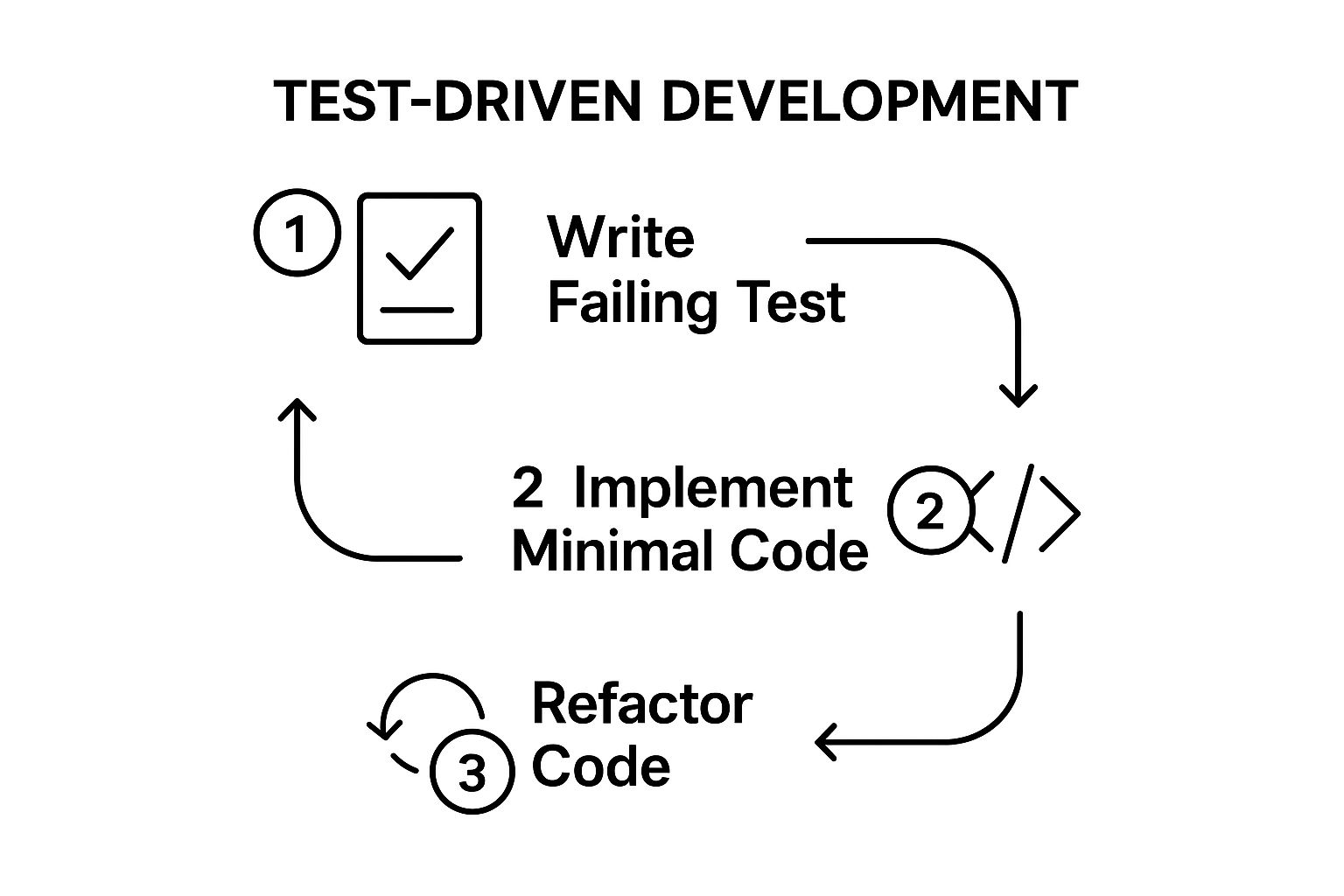
The infographic clearly demonstrates the cyclical and iterative nature of TDD, highlighting the importance of the sequence: failing test first, followed by implementation, and finally, refactoring. This continuous loop ensures that every piece of functionality is thoroughly tested and refined.
TDD offers a wealth of benefits. It significantly reduces debugging time by catching errors early in the development process. It provides immediate feedback on code changes, ensuring that new code doesn't break existing functionality. Furthermore, TDD promotes high code coverage, meaning a larger portion of your codebase is tested, leading to increased confidence in its reliability. TDD also encourages better code design and modularity, resulting in cleaner, more maintainable code. And finally, it enables confident refactoring, allowing you to improve your code without fear of introducing bugs.
Here are some examples of successful TDD implementations: The Ruby on Rails community has heavily adopted TDD principles, contributing to the framework’s reputation for stability and developer-friendliness. Popular testing frameworks like Jest for JavaScript, JUnit for Java, and pytest for Python make it easier to implement TDD across different programming languages. These tools provide the infrastructure for writing and running tests efficiently, enabling developers to integrate TDD seamlessly into their workflows.
While TDD offers substantial advantages, it also has some drawbacks. Setting up the initial test infrastructure can take time, and mastering TDD requires discipline and practice. Initially, it might feel like TDD slows down development. There's also the risk of over-testing trivial functionalities, which can add unnecessary overhead. Lastly, there's a learning curve associated with mastering testing frameworks.
So, how can you effectively integrate TDD into your coding workflow? Start with simple, focused tests that target specific functionalities. Write the minimum code necessary to pass each test, avoiding premature optimization. Once the tests pass, refactor the code to improve its structure and readability. Use descriptive test names that clearly explain the behavior being tested. And finally, maintain fast test execution times to keep the feedback loop tight and efficient. These tips, combined with the continuous Red-Green-Refactor cycle, will allow you to harness the full power of TDD.
TDD has been championed by influential figures in the software development world, including Kent Beck, a pioneer of Extreme Programming (XP), Martin Fowler, a renowned author and speaker on software development best practices, Robert C. Martin (Uncle Bob), a strong advocate for clean code principles, and David Heinemeier Hansson (DHH), creator of Ruby on Rails. Their advocacy has helped popularize TDD and demonstrate its effectiveness in creating high-quality, maintainable software.
Incorporating TDD into your coding practice can be a game-changer. While there is an initial investment in learning and setup, the long-term benefits in terms of reduced debugging time, improved code quality, and enhanced developer confidence are undeniable. By embracing the Red-Green-Refactor cycle and following the practical tips outlined above, you can unlock a more efficient and enjoyable coding experience, ultimately allowing you to code faster and smarter.
4. Code Generation and Automation Tools
One of the most effective strategies to code faster is leveraging the power of code generation and automation tools. These tools, ranging from simple scripts to sophisticated generators, automate the creation of repetitive code structures, database schemas, API endpoints, and other boilerplate code, allowing you to focus on the unique logic of your application. This approach significantly accelerates development, especially in the initial phases of a project. Want to learn how to code faster? Automation is key.
Instead of manually writing the same boilerplate code repeatedly, you can define templates or specifications that these tools use to generate the required code automatically. Imagine building a web application. Instead of manually creating the CRUD (Create, Read, Update, Delete) operations for each database entity, a code generator can create the necessary models, controllers, and views based on your database schema, saving you hours of tedious work. This is precisely how code generation contributes to faster coding practices.
Code generation and automation come in various forms, catering to different needs:
- Automated Scaffold Generation: Tools like Ruby on Rails generators and the Angular CLI can quickly scaffold entire application modules, including UI components, backend logic, and database interactions. This allows you to build a basic working prototype within minutes.
- Database Schema to Code Conversion: Tools like Prisma can generate database clients and models directly from your database schema, ensuring consistency and eliminating manual data access code.
- API Endpoint Generation from Specifications: Using OpenAPI/Swagger definitions, you can automatically generate server stubs and client SDKs for your APIs, streamlining the development process for both backend and frontend teams.
- UI Component Generation: Many frontend frameworks offer CLI tools that generate UI components with pre-defined styles and functionalities, allowing you to quickly build user interfaces without writing repetitive HTML, CSS, and JavaScript.
- Custom Script Automation: For specific repetitive tasks within your project, writing custom scripts can automate file creation, code formatting, and other tedious processes.
By automating these tasks, you can drastically reduce the time spent on mundane coding, allowing you to focus on the core functionalities and features of your application. This not only speeds up development but also improves code quality.
Pros of Using Code Generation and Automation Tools:
- Eliminates Repetitive Coding Tasks: Say goodbye to writing boilerplate code over and over again.
- Ensures Consistency in Generated Code: Automated tools produce consistent code, reducing discrepancies and improving maintainability.
- Reduces Human Error in Boilerplate Code: Manual coding is prone to errors, especially in repetitive tasks. Automation minimizes this risk.
- Speeds up Initial Project Setup: Quickly create a working prototype or foundation for your project.
- Enforces Coding Standards Automatically: Generators can be configured to adhere to your project's coding style guide.
Cons of Using Code Generation and Automation Tools:
- Generated Code May Not Be Optimal: The generated code might not always be the most efficient solution.
- Can Create Unnecessary Complexity: Over-reliance on generators can sometimes lead to complex and difficult-to-understand code structures.
- Requires Understanding of Generation Tools: You need to invest time in learning how to use these tools effectively.
- May Produce Code That's Hard to Customize: Heavily customized generated code can be challenging to maintain and update.
- Dependency on External Tools: Your project becomes dependent on the specific generation tools used.
Tips for Effective Code Generation:
- Customize Generators to Match Your Coding Standards: Configure the tools to produce code that aligns with your project's style and conventions.
- Review Generated Code Before Committing: Always inspect the generated code to ensure it meets your requirements and quality standards.
- Learn to Modify Generator Templates: Understanding how to adjust the templates allows you to customize the generated code further.
- Combine Multiple Generators for Complex Workflows: Leverage different generators to automate various aspects of your project.
- Create Custom Generators for Repeated Patterns: If you encounter recurring patterns in your codebase, consider creating your own custom generators.
Platforms like Ruby on Rails (popularized by DHH), Yeoman (Google), Angular CLI (Google), Spring Boot (Pivotal), and the OpenAPI Initiative have significantly contributed to the widespread adoption of code generation and automation tools. Learn more about Code Generation and Automation Tools. These tools are essential for any developer striving for increased productivity and efficient workflows. By strategically incorporating code generation and automation into your development process, you'll not only code faster but also build higher-quality, more maintainable software.
5. Copy-Paste Programming with Adaptation: Leverage Existing Code to Code Faster
In the fast-paced world of software development, speed and efficiency are paramount. One strategy that can significantly accelerate your coding process is "Copy-Paste Programming with Adaptation." While the term might evoke images of mindless duplication, when employed strategically, it becomes a powerful tool for experienced and aspiring developers alike. This technique involves reusing existing code snippets from reliable sources like previous projects, open-source repositories, documentation, or even Stack Overflow and adapting them to fit your specific needs. This isn't about plagiarism; it's about leveraging the wealth of available knowledge to build upon existing solutions and code faster. This approach deserves a place on this list because it empowers developers to avoid reinventing the wheel, allowing them to focus on the unique aspects of their projects.
How it Works:
Copy-paste programming with adaptation is more than just blindly copying and pasting code. It's a multi-step process that involves:
-
Identification: Pinpoint the functionality you need to implement. Are you building a sorting algorithm? Trying to integrate a payment gateway? Identifying the specific task is the first step.
-
Source Discovery: Locate reliable sources containing code that addresses your identified need. Explore open-source repositories on GitHub, delve into official documentation, browse through Stack Overflow solutions, or examine code sharing platforms like CodePen.
-
Understanding: Before integrating any code, thoroughly understand its logic, dependencies, and potential limitations. What are the inputs and outputs? What algorithms are employed? Are there any security implications? This crucial step mitigates the risk of introducing bugs or vulnerabilities.
-
Adaptation: Modify the copied code to seamlessly integrate it into your project. This may involve changing variable names, adjusting data types, or refactoring sections to align with your specific architecture and requirements.
-
Testing and Debugging: Rigorously test the adapted code to ensure it functions as intended and doesn't introduce any errors into your application.
Examples of Successful Implementation:
-
Utilizing a Stack Overflow solution: Imagine you're struggling with a complex regular expression. Finding a well-vetted solution on Stack Overflow, understanding its mechanics, and adapting it to your specific input string can save valuable time and effort.
-
Leveraging GitHub repositories: Suppose you're building a web application and need to implement user authentication. Exploring open-source repositories on GitHub can provide robust and well-tested authentication modules that you can adapt and integrate into your project.
-
Learning from Official Documentation: Many libraries and frameworks offer comprehensive documentation with code examples. Copying and adapting these examples can be an effective way to learn how to utilize specific functionalities and integrate them into your projects.
Actionable Tips for Coding Faster with This Method:
-
Prioritize understanding: Always fully comprehend the code's functionality and implications before integrating it. Don't just copy and paste blindly.
-
Adapt, don't just copy: Modify variable names, comments, and code structure to match your project's conventions and enhance readability.
-
Respect licenses: Pay close attention to licensing requirements when using code from external sources. Ensure you comply with the terms and provide proper attribution.
-
Test thoroughly: Implement comprehensive tests to validate the functionality and identify any potential bugs or vulnerabilities introduced by the copied code.
-
Document your sources: Maintain a record of the code's origin and any modifications made. This facilitates future maintenance and avoids potential plagiarism concerns.
Pros and Cons:
Pros:
- Rapid Implementation: Significantly accelerates the development of common functionalities.
- Leverage Proven Solutions: Integrates tested and optimized code, reducing the risk of errors.
- Accelerated Learning: Provides a practical way to learn new technologies and coding patterns.
- Reduced Development Time: Frees up time to focus on unique project aspects.
Cons:
- Risk of Poor Code: Copying from unreliable sources can introduce bugs and vulnerabilities.
- Understanding Gaps: Blindly copying without understanding can hinder learning and debugging.
- Licensing Issues: Using code without proper attribution can lead to legal complications.
- Security Risks: Copied code may contain hidden security vulnerabilities.
- Integration Challenges: Code may not perfectly align with specific project requirements.
By understanding the principles of copy-paste programming with adaptation, and by following the provided tips, developers can effectively leverage this technique to code faster and more efficiently, building upon the collective knowledge of the programming community while still creating innovative and unique solutions.
6. Focused Coding Sessions and Time Management
One of the most effective strategies to code faster isn't about typing speed, but about optimizing your focus and minimizing distractions. Focused coding sessions, combined with smart time management techniques, can drastically improve your productivity and code quality. This approach structures your coding time into dedicated blocks, interspersed with short breaks, to maintain high concentration and prevent burnout. This allows you to enter a state of deep work, where you can tackle complex problems and produce high-quality code more efficiently. By minimizing context switching and dedicating your full attention to the task at hand, you'll find yourself producing more code in less time. This approach is invaluable for anyone looking to optimize their workflow, from aspiring "vibe coders" and seasoned software developers to digital artists, educators, and tech entrepreneurs.

This method works by leveraging the power of focused bursts of activity followed by short periods of rest. This structure helps maintain mental stamina and prevents the drain of continuous, uninterrupted work. Several techniques fall under this umbrella, including the popular Pomodoro Technique, deep work sessions, and time-boxing. Each involves dedicating specific blocks of time to focused coding, eliminating distractions, and taking regular breaks to maintain energy and concentration. This structured approach not only improves your coding speed but also enhances the quality of your code by promoting clearer thinking and reducing errors.
Examples of Successful Implementation:
- Pomodoro Technique: This classic technique involves 25-minute focused coding sessions followed by a 5-minute break. After four "Pomodoros," take a longer break of 20-30 minutes. This cyclical approach is particularly effective for breaking down larger tasks into manageable chunks.
- Deep Work Blocks: For tackling complex problems requiring deep concentration, dedicate longer blocks of 2-4 hours to uninterrupted coding. Ensure you create a distraction-free environment to maximize the effectiveness of these sessions.
- Time-boxing: Allocate specific time slots for particular features or bug fixes. This creates a sense of urgency and helps you stay on track.
Actionable Tips for How to Code Faster with Focused Sessions:
- Start Small and Gradually Increase: Begin with shorter focused sessions (e.g., 15 minutes) and gradually increase the duration as your focus improves.
- Eliminate Distractions: Use website blockers, turn off notifications, and communicate your availability to minimize interruptions during coding sessions.
- Plan Your Tasks: Before starting a focused session, clearly define the tasks you intend to accomplish. This prevents aimless coding and maximizes productivity.
- Take Genuine Breaks: Step away from your computer during breaks. Stretch, walk around, or engage in a non-screen activity to refresh your mind.
- Track Your Productivity: Monitor your output during different session lengths to identify your optimal focus period.
When and Why to Use This Approach:
Focused coding sessions are particularly beneficial when:
- Tackling complex problems: Deep work sessions facilitate focused problem-solving and creative thinking.
- Meeting tight deadlines: Structured sessions create a sense of urgency and help you stay on schedule.
- Improving code quality: Reduced distractions lead to fewer errors and cleaner code.
- Preventing burnout: Regular breaks prevent mental fatigue and maintain sustainable productivity.
Pros and Cons:
Pros:
- Improved focus and concentration
- Reduced context switching overhead
- Maintained consistent energy levels
- Increased overall code quality
- Prevention of burnout through structured breaks
Cons:
- Requires discipline to maintain
- May not suit all personality types
- Can be disrupted by urgent tasks
- Initial productivity may seem slower
- Needs adjustment period to find optimal timing
Focused coding sessions and time management are crucial for coding faster and more effectively. By implementing these techniques and tailoring them to your specific needs, you can significantly enhance your productivity, improve your code quality, and create a more sustainable and enjoyable coding experience. This approach is not a quick fix, but a long-term strategy for maximizing your potential as a coder.
7. Continuous Learning and Skill Sharpening
Want to know how to code faster? It might seem counterintuitive, but stepping away from your immediate project to dedicate time to learning can significantly boost your coding speed in the long run. This is the power of continuous learning and skill sharpening. It's not a quick fix, but a sustained strategy that focuses on regularly updating your programming skills, learning new technologies, and staying current with best practices. Faster coding doesn't just come from memorizing syntax; it arises from improved knowledge, better problem-solving skills, and familiarity with modern tools and techniques.
This approach acknowledges that the tech landscape is constantly evolving. New languages emerge, frameworks update, and best practices are refined. By embracing continuous learning, you ensure your skills remain relevant and you're equipped to tackle challenges with the most efficient and effective solutions. Think of it like a craftsman constantly honing their tools – the sharper the tools, the faster and more precise the work.
Continuous learning encompasses a range of activities. Regularly learning new programming concepts is crucial. This could involve diving deeper into the nuances of your primary language or exploring a new paradigm altogether. Staying updated with language and framework changes ensures you're leveraging the latest features and optimizations. Practice is key, and engaging with coding challenges and exercises, like those found on platforms like HackerRank or LeetCode, helps solidify your understanding and improve your problem-solving abilities. Active participation in developer communities, through online forums, meetups, or conferences, provides valuable opportunities for knowledge sharing and peer learning. Contributing to open-source projects allows you to learn from experienced developers and apply your skills in real-world scenarios. Finally, online courses and certification programs offer structured learning paths and validation of your expertise.
The benefits of continuous learning are numerous. It demonstrably improves long-term coding efficiency. By staying updated with the latest tools and techniques, you can leverage pre-built solutions, optimize your code, and avoid reinventing the wheel. This directly translates to faster development times. Furthermore, it keeps your skills relevant and marketable in a competitive industry. Expanding your problem-solving toolkit allows you to approach challenges from multiple angles and find the most elegant solutions. Continuous learning also increases your confidence in tackling new challenges and fosters a growth mindset. Finally, engaging with the developer community builds a professional network and opens doors to new opportunities.
However, continuous learning isn't without its challenges. It requires a significant time investment, and carving out dedicated learning time can be difficult, especially when juggling project deadlines. The sheer volume of available resources can lead to analysis paralysis with too many options and the potential for information overload. Prioritizing what to learn and aligning it with your career goals is crucial. It's easy to get sidetracked by the latest shiny new technology, but focusing on skills relevant to your specific needs is more effective. The temptation to constantly learn new things can also distract from current project deadlines. Finding the right balance between learning and applying that knowledge is essential.
Successful implementation of continuous learning often involves incorporating it into your daily routine. For example, dedicating even just 30 minutes each day to a coding challenge or reading a technical blog can make a significant difference over time. Following programming blogs and newsletters, attending developer conferences and meetups, and contributing to open-source projects are excellent ways to stay engaged and learn from others. Online courses and certification programs provide more structured learning experiences. Tech companies often foster learning cultures through internal training programs, mentorship opportunities, and dedicated learning time.
Learn more about Continuous Learning and Skill Sharpening
For aspiring vibe coders, experienced software developers, digital artists, creative technologists, educators, students in tech, innovative entrepreneurs, and hobbyists alike, continuous learning is no longer optional, but a necessity. It’s a crucial element in answering the question of how to code faster and more effectively. By embracing a mindset of lifelong learning, you'll not only accelerate your coding speed but also future-proof your career and unlock a world of possibilities. Remember, the journey of a coder is one of continuous growth and discovery. Invest in your skills, and you'll reap the rewards for years to come. Set aside dedicated time for learning each week, focus on technologies relevant to your goals, practice new concepts in real projects, join coding communities and forums, and even teach others to reinforce your own learning. The coding landscape is constantly evolving, and continuous learning is the key to staying ahead of the curve and achieving mastery.
7 Techniques for Faster Coding Compared
| Technique | Implementation Complexity 🔄 | Resource Requirements ⚡ | Expected Outcomes 📊 | Ideal Use Cases 💡 | Key Advantages ⭐ |
|---|---|---|---|---|---|
| Code Snippets and Templates | Low to Medium: Requires initial setup and maintenance | Low: Personal libraries and IDE integration | Consistent, rapid prototyping, reduced repetitive coding | Projects with repetitive patterns or scaffolding | Saves time, ensures consistency, reduces syntax errors |
| Keyboard Shortcuts and IDE Mastery | Medium to High: Steep learning curve and muscle memory | Low: No additional tools, IDE knowledge needed | Increased coding speed, improved focus | Intensive coding sessions, tasks needing fast navigation | Dramatically improves speed and efficiency |
| Test-Driven Development (TDD) | High: Requires discipline, test infrastructure setup | Medium: Testing frameworks and tooling | High code quality, fewer bugs, confident refactoring | Critical codebases, high-quality software projects | Reduces debugging, ensures coverage, improves design |
| Code Generation and Automation Tools | Medium: Tool setup and customization needed | Medium to High: Dependence on external tools | Faster initial setup, reduced repetitive code | Large projects, repetitive boilerplate code generation | Enforces standards, eliminates repetitive tasks |
| Copy-Paste Programming with Adaptation | Low: Easy to start but demands understanding | Low: Access to reliable code sources | Quick implementation, learning from proven solutions | Rapid prototyping, leveraging existing solutions | Accelerates development, leverages community knowledge |
| Focused Coding Sessions & Time Management | Low to Medium: Needs discipline and environment setup | Low: Time management tools or none required | Better focus, higher productivity, prevents burnout | Managing distractions, improving work discipline | Enhances concentration, reduces context switching |
| Continuous Learning and Skill Sharpening | Medium: Ongoing time commitment and prioritization | Medium: Requires courses, challenges, and community | Long-term efficiency, modern skillset | Personal and professional growth, adapting to new tech | Keeps skills relevant, expands problem-solving toolkit |
Code Like a Pro: Embrace Efficiency
Coding faster isn't about slapping together lines of code haphazardly; it's about optimizing your workflow for maximum efficiency. Throughout this article, we've explored seven key strategies to help you learn how to code faster: leveraging code snippets and templates, mastering keyboard shortcuts and your IDE, embracing test-driven development (TDD), utilizing code generation and automation tools, adapting existing code through smart copy-pasting, implementing focused coding sessions with effective time management, and committing to continuous learning. These techniques aren't just isolated tips; they are interconnected practices that build upon each other to create a powerful synergy.
The most impactful takeaways revolve around recognizing the value of both preparation and adaptation. Investing time in setting up a strong foundation – like mastering your IDE and building a library of reusable code snippets – pays dividends down the line. Simultaneously, embracing agile methodologies like TDD and remaining adaptable to new tools and technologies empowers you to tackle any coding challenge with confidence and speed.
So, what's next? Start by identifying one or two of these strategies that resonate most with your current workflow. Experiment with them, refine your approach, and observe the impact on your coding speed and overall productivity. Perhaps you begin by dedicating 15 minutes each day to learning new keyboard shortcuts or explore a new code generation tool relevant to your current project. Small, consistent steps will yield significant long-term results.
Mastering these approaches is more than just about saving time; it's about unlocking your full coding potential. By streamlining your process and eliminating unnecessary friction, you free up mental space for creativity and problem-solving. This translates to not only faster coding, but also higher quality code, increased job satisfaction, and greater overall impact in your projects. Remember, the Vibecoding VIP platform, curated by @slhomme, offers a wealth of resources to further enhance your coding journey in 2025 and beyond. Embrace these techniques, explore the resources available, and become the efficient, impactful coder you aspire to be. Your coding future is waiting – seize it!