Getting your resource allocation right is less about managing spreadsheets and more about strategically deploying your most valuable assets: your people, your budget, and your tools. The goal is simple: get the biggest impact from your projects without running your team into the ground. It’s about ditching the guesswork and making smart, data-informed decisions so the right people are on the right tasks, right when they need to be.
Why Old-School Resource Allocation Doesn't Cut It Anymore
Let’s be real for a moment. Most project failures aren't born from a lack of resources. They come from stubbornly sticking to management methods that are well past their expiration date. When you’re relying on static spreadsheets and gut feelings to make critical decisions, you’re practically inviting budget overruns, blown deadlines, and a completely fried team. These old approaches just can't hang.
Think about this scenario, which plays out in offices every single day. A lead developer gets assigned to three high-priority projects at once. On paper—or, more likely, in an outdated Excel file—it looks fine. But that plan completely ignores their actual capacity. Before you know it, all three projects are at a standstill, creating a massive bottleneck. This isn't just some textbook example; it's the painful reality for teams trapped by rigid, top-down planning.
The Real Price of Bad Planning
The damage from clumsy resource management is huge, and it goes way beyond the balance sheet. Sure, you’re wasting money, but you’re also losing out on major opportunities and watching team morale plummet. When your top talent is buried in low-impact tasks, you can kiss innovation goodbye.
The numbers tell a pretty stark story. Globally, less than 60% of projects actually stick to their original budget, and only about 50% wrap up on time, largely because of poor resource planning. On the flip side, companies that have switched to a more data-driven approach have seen a 35% drop in the time they spend on manual management. If you want to dig into the data, you can check out some eye-opening resource allocation findings from Retain International.
The fundamental flaw with traditional methods is that they’re completely inflexible. They just can't handle the one thing you can always count on in any project: change. A key person gets sick, the client suddenly wants a major new feature, or a technical roadblock pops up out of nowhere. A static plan just crumbles under that kind of pressure.
Common Traps of Legacy Methods
To get ahead, you first have to understand what’s holding you back. Old-fashioned resource allocation is full of predictable pitfalls.
-
Siloed Information: When every department has its own spreadsheet for tracking resources, nobody has the full picture. This is how you end up double-booking your best people or, worse, completely overlooking available talent just sitting on the bench.
-
"Loudest Voice" Prioritization: We've all seen it. Resources get assigned not to the most strategic project, but to the manager who shouts the loudest. This just breeds resentment and pulls the entire company's efforts out of alignment.
-
Ignoring Team Well-being: Pushing your team to 110% capacity isn't a sign of efficiency—it's a fast track to burnout. Legacy systems almost never account for workload balance, which slowly but surely leads to exhausted, disengaged, and ultimately, less productive teams.
Once you see these failures for what they are, it becomes crystal clear why getting resource allocation right is non-negotiable for any team serious about staying competitive and delivering great work.
Before you can start shifting resources around, you first need a crystal-clear picture of what you're actually working with. This is where a thorough resource audit comes in. It’s about creating an honest, no-fluff inventory of every asset you have—from your team's skills to your tech stack and budget.
Think of it like getting your kitchen in order before cooking a big meal. You need to know what ingredients you have, what's about to expire, and what tools are at your disposal. Without this initial survey, any planning you do is just a shot in the dark.
Conducting A Comprehensive Resource Audit

The goal here is to create a single source of truth, a centralized map of your entire resource pool. This map is what allows you to stop guessing and start making smart, strategic decisions.
Cataloging Your Human Capital
Let's start with your most valuable asset: your people. This is more than just looking at an org chart. You need to dig into who is on your team, what they truly bring to the table, and how much they can realistically take on.
For every person, I recommend documenting a few key things:
- Skill Sets: What are their go-to skills? What about secondary talents? You might have a backend developer who’s surprisingly good with UI mockups or a project manager with a knack for technical writing.
- Current Workload: What's already on their plate? Getting a real sense of their current projects and commitments is the only way to gauge their actual capacity for new work.
- Cost and Availability: Note the cost associated with their role and their work status. Are they a full-time employee, a part-timer, or a contractor with a fixed number of hours?
I’ve seen this process uncover so much hidden potential. You might find skills you never knew you had on the team, which can completely change how you approach your next project.
A huge mistake I see people make is focusing only on hard, technical skills. Don't overlook the soft skills—things like communication, leadership, and creative problem-solving. These are often the very things that make a project team click and are absolutely essential for smart resource allocation.
Assessing Technology and Financial Assets
Even the best team can't do much without the right tools and a solid budget. The next part of your audit is to take a hard look at your tech and financial resources.
First, list out all the software licenses, hardware, and subscriptions your team relies on. I’ve found that this simple exercise often reveals some quick wins. Are you paying for expensive tools that are gathering digital dust? Or maybe you have a team limping along with outdated software that’s killing their productivity. Spotting these issues is a core part of optimizing resource allocation.
To get a better handle on what you should be tracking, you can find some great tools and guides on the Vibecoding VIP resources page.
Finally, get transparent about your finances. What’s the actual budget for your upcoming projects? Do you have a contingency fund set aside for those inevitable surprises? A clear financial picture prevents you from overcommitting and ensures your projects have the fuel they need to cross the finish line.
Resource Audit Checklist
To pull all this together, a simple checklist can be incredibly helpful. It ensures you don't miss anything as you evaluate your human, technological, and financial assets.
| Resource Category | Key Audit Points | Tools & Methods |
|---|---|---|
| Human Resources | – Document primary/secondary skills – Assess current project workloads – Identify soft skills (leadership, communication) – Note availability (full-time, part-time, etc.) |
– Skills matrix spreadsheets – One-on-one check-ins – Project management software reports |
| Technological Resources | – List all software subscriptions & licenses – Inventory physical hardware – Evaluate tool usage and adoption rates – Identify performance bottlenecks |
– Subscription management tools – IT asset inventory logs – User surveys & feedback sessions |
| Financial Resources | – Define project-specific budgets – Confirm contingency fund availability – Track current spending vs. budget – Review historical project costs |
– Accounting software (e.g., QuickBooks) – Budgeting spreadsheets – Financial reports & forecasts |
With this foundational audit complete, you'll have the clarity you need to move forward and build an allocation strategy that’s both robust and effective.
Building Your Strategic Capacity Plan

Alright, you've audited your current resources. Now it’s time to stop reacting and start planning. This is where strategic capacity planning makes all the difference. Think of it as building a bridge from where you are today to where your projects need to be six months or a year from now.
This isn't about the daily grind of who's doing what this week—that's resource management. Capacity planning is about looking at the bigger picture. It answers the crucial question: "Do we have the right skills and people on board to hit our goals next quarter?"
Answering this proactively means you're no longer just putting out fires. You're intentionally building a team and a toolkit that's ready for your long-term ambitions.
Forecasting Future Demand
Your first move is to look over the horizon. You need a solid forecast of what your team will be up against in the coming months. This isn't just guesswork; it's a calculated look at a few key things.
-
Project Pipeline Analysis: Start with what's concrete. What projects are already on the books? Which ones are highly probable? For each, map out the roles and specific skills you'll need. Don't just say "a developer"; specify "a senior Python dev with API experience."
-
Historical Data Review: Your past projects are a goldmine of information. How long did that last big feature really take? Where did you hit unexpected snags? Use this data to ground your forecasts in reality, not just wishful thinking.
-
Business Goal Alignment: Where is the company going? If marketing is planning a huge push into a new vertical or a new product is launching, you'd better believe that's going to ripple back to your team's workload and skill requirements.
This kind of forecasting is what turns optimizing resource allocation from a defensive scramble into a powerful offensive play. You'll always be one step ahead.
It's a common struggle. Research shows that 90% of leadership teams know capacity building is a top priority, but a staggering 5% feel they have a handle on it. A huge part of this disconnect comes from trying to match your team's capacity with the unpredictable nature of customer demand. You can dive deeper into these capacity planning insights from Runn.io.
Balancing Capacity And Demand
With a solid forecast in hand, the gaps become obvious. Maybe you see a cliff coming for your backend developers in Q3, or you realize the design team is about to be completely underwater in October. Now you can make smart moves to close those gaps before they become full-blown crises.
You essentially have three main levers to pull:
- Hiring: If you see a consistent, long-term need for a certain skill set, it's probably time to open a new full-time position.
- Upskilling: Look at your existing team. Could you train someone to fill an upcoming need? This is an incredible way to invest in your people and boost loyalty.
- Contracting: For specialized, short-term projects, bringing in a freelancer or contractor is often the most flexible and cost-effective solution.
The ultimate aim is to build a workforce plan that can bend without breaking. This strategic approach ensures you have the right people with the right skills, ready to jump on projects the moment they get the green light. That's how you prevent burnout and keep your initiatives on the path to success.
Putting a Dynamic Allocation Framework into Action
Theory is great, but let's get practical. Putting a dynamic allocation framework into practice is where the rubber meets the road. It’s time to ditch those static, long-term plans that crumble the second an unexpected bug or a new stakeholder request lands on your desk. A truly dynamic framework is all about being nimble and responsive, giving you the power to navigate the chaos of real-world projects.
This isn't about giving resources to the team that shouts the loudest. Instead, it’s a shift toward prioritizing projects based on what truly matters: strategic value, critical need, and hard data. This approach makes sure your most important work always gets the fuel it needs to succeed.
Think of it as a continuous cycle: you identify what needs to be done, assign the right people, and then constantly check back to see how things are going and adjust as needed.
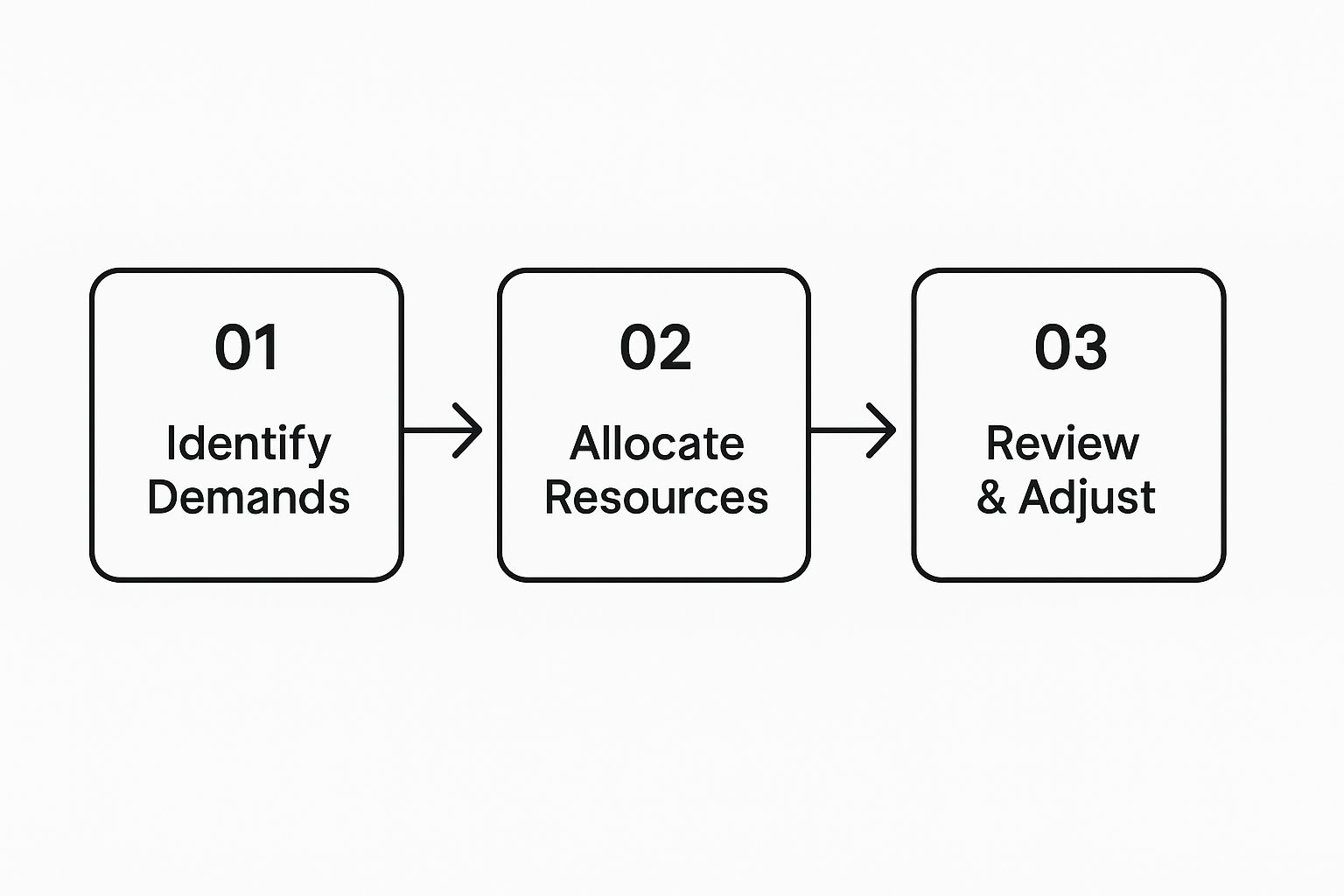
This model really drives home the point that optimizing resource allocation isn't a "set it and forget it" task. It's an ongoing loop of assessment, action, and refinement.
Embrace the 80/20 Allocation Rule
One of the most effective strategies I've seen within a dynamic framework is the 80/20 rule. This isn't about your team working less; it's about you planning smarter. You deliberately commit 80% of your team's available time to the planned, scheduled work that directly pushes your big-picture goals forward.
So, what about the other 20%? You hold it in reserve. This isn't just empty time on the calendar; it's a flexible buffer you can deploy strategically for the things you can't plan for.
- Sudden Fires: Think critical bugs, production outages, or urgent client demands that just can't wait.
- Golden Opportunities: An unexpected chance to innovate, respond to a competitor's move, or run a quick experiment.
- Growth and Exploration: Giving the team time to learn a new technology, sharpen their skills, or work on some creative R&D.
Having this flexibility built-in is a game-changer. It means your team can absorb real-world disruptions without throwing the entire roadmap into disarray.
By intentionally reserving this capacity, you shift from constantly fighting fires to proactively managing them. You have resources ready for the unexpected, which dramatically reduces team burnout and keeps your projects stable. It’s a fundamental change that pays dividends.
Prioritize with Data, Not Decibels
For this to work, you absolutely need a clear, objective way to prioritize. This ensures that when you dip into that 20% buffer, it's for something that truly warrants the attention. From my experience, a simple impact/effort matrix is one of the best tools for this.
| Priority Level | Description | How to Handle It |
|---|---|---|
| High-Impact, Low-Effort | These are your quick wins—the tasks that deliver massive value for minimal work. | Greenlight these immediately. They are perfect candidates for your 20% buffer. |
| High-Impact, High-Effort | Your major strategic projects and core initiatives. | These belong in your 80%. Plan and schedule them deliberately. |
| Low-Impact, Low-Effort | Small tweaks, minor improvements, or "nice-to-haves." | Fit them in when you have spare capacity, but never let them pull from your buffer. |
| Low-Impact, High-Effort | Time sinks that offer very little return. | Seriously question if these are worth doing at all. Often, the best move is to avoid them. |
This kind of matrix gives you a logical, defensible way to evaluate every request that comes your way.
Of course, you can't manage this on a spreadsheet for long. Modern project management tools like Jira, Asana, or Monday.com are crucial. They give you the real-time visibility you need to monitor workloads, track how you're using your 80/20 split, and make quick, informed decisions. Without that clear view, the best framework is just a nice idea on paper.
Using Technology for Smarter Resource Allocation
Trying to manage modern project resources with a manual spreadsheet is like navigating a city rush hour with a paper map. Sure, you might get there eventually, but you'll be inefficient, stressed, and almost certain to miss a few critical turns. Today's technology is your GPS for smart, agile resource optimization.
These platforms aren't just glorified digital calendars; they're intelligent systems that help you see what's coming. By digging into your past project data, they can forecast future needs with an accuracy that often feels like a superpower.
Think about it. A tool could scan your last five projects, notice that backend development consistently becomes a bottleneck around the second month, and proactively flag it for your next big initiative. That’s predictive forecasting in action. You stop reacting to problems and start preventing them before they even happen.
Let AI Do the Heavy Lifting with Suggestions and Automation
The real game-changer is when artificial intelligence gets involved. AI-driven resource management tools don't just track who is doing what; they offer genuinely intelligent suggestions. They can recommend the ideal team makeup for a new project based on a mix of skills, availability, and even how well certain people have performed on similar tasks in the past.
For example, an AI might suggest pairing a senior developer known for great mentorship with a junior engineer who needs to sharpen their skills on a particular tech stack. This kind of data-backed, nuanced decision is something that's incredibly difficult, if not impossible, to nail down with manual methods alone.
These tools also take the tedious, soul-crushing admin work off a project manager's plate.
- Automated Scheduling: Instantly finds and books open time slots across multiple calendars.
- Workload Balancing: Throws up an alert when a team member is overloaded and at risk of burnout.
- Skill Matching: Pinpoints the best person for an urgent task by searching a comprehensive skills database in seconds.
By automating the routine parts of allocation, you empower your managers to focus on what humans do best: strategy, mentoring their people, and clearing roadblocks. It’s a complete shift in how we lead projects.
Choosing the Right Tools for Your Team
The market for these platforms is expanding quickly. It’s expected that by 2025, the use of AI and big data will drive a major shift toward real-time monitoring and predictive planning in resource management. This isn't just about cool tech; it's about real productivity gains.
The trick is to find the right tool that solves your specific problems. It's easy to get mesmerized by a long list of shiny features. Instead, start by identifying your biggest headaches. Is it forecasting? Workload balancing? Skills management?
Finding the right fit is everything. For teams in creative and technical fields, looking at a curated list of software can cut through the noise. To get started, you might want to check out our guide to vibe coding tools, where we highlight platforms built for managing dynamic, innovative projects.
When you select technology that truly aligns with your workflow, you transform optimizing resource allocation from a constant struggle into one of your biggest strategic advantages.
Common Questions About Resource Allocation
Even with the best plan in hand, switching to a more fluid way of managing resources is going to bring up some tricky questions. I get these all the time from managers and team leads. Let's walk through some of the most common hurdles and how to clear them.
Where Do I Even Begin?
The sheer scope of overhauling resource management can feel paralyzing. My advice? Start small. Forget about trying to transform your entire department's workflow in a single week.
Instead, pick one small, self-contained project to serve as your pilot. Just focus on tracking time and how people are being used for that single project. This gives you a safe space to test your new process, collect some real-world data, and score a quick win. A little success right out of the gate is the best way to build momentum and convince others this is a path worth taking.
How Do I Handle Team Resistance?
Look, nobody likes change being forced on them. If your team is used to doing things a certain way, you're bound to hit some resistance. The secret is in the framing. This isn't a top-down order to make them work harder; it's a solution to the frustrations they're already feeling.
You know the ones I'm talking about—the constant context-switching, the impossible deadlines, the feeling of being spread too thin. Start the conversation there. Position this new approach as a way to create more stability, protect their deep-work time, and make their days less chaotic.
When you can show your team that the goal is to reduce their stress and eliminate burnout—not just to squeeze more productivity out of them—you'll turn skeptics into advocates. The focus should be on creating a sustainable, healthier work environment for everyone.
If you need a concrete example to point to, showing them some well-balanced vibe coding project examples can really help. It demonstrates what smart resource distribution looks like in practice.
What Metrics Actually Matter?
It’s incredibly easy to drown in data. To avoid getting stuck in "analysis paralysis," just zero in on a handful of key performance indicators (KPIs) that give you a clear, honest look at your resource health.
Here are the big three I always recommend:
-
Resource Utilization Rate: This is a simple but powerful metric. It tells you what percentage of your team's available time is spent on productive work. If it's consistently creeping above 90%, you have a serious burnout risk on your hands. If it's too low, you're bleeding efficiency.
-
Task Effort Variance: I love this one. It's the gap between your estimate and the actual time a task took. Big differences here are a huge red flag. They tell you that either your initial scoping is off or there are hidden roadblocks you need to uncover.
-
Project Cost Efficiency: At the end of the day, it all comes down to the bottom line. This metric stacks the value a project delivered against what it cost in people-hours. It’s the ultimate gut check on whether your allocation strategy is actually making good business sense.